class: inverse, middle, left, my-title-slide, title-slide .title[ # Generalized Additive Models ] .subtitle[ ## a data-driven approach to estimating regression models ] .author[ ### Gavin Simpson ] .institute[ ### Department of Animal & Veterinary Sciences · Aarhus University ] .date[ ### 1400–2000 CET (1300–1900 UTC) Thursday 11th January, 2025 ] --- class: inverse middle center big-subsection # Day 4 ??? --- # Logistics ## Slides Slidedeck: [bit.ly/physalia-gam-4](https://bit.ly/physalia-gam-4) Sources: [bit.ly/physalia-gam](https://bit.ly/physalia-gam) --- # Today's topics * A bit more in inference * Credible intervals for smooths * *p* values for smooths * AIC * Hierarchical GAMs (HGAMs) Introducing random smooths and how to model data with both group and individual smooth effects. * Doing more with your models; introducing posterior simulation. --- class: inverse center middle subsection # Credible intervals for smooths --- # Credible intervals for smooths `plot.gam()` produces approximate 95% intervals (at +/- 2 SEs) What do these intervals represent? Nychka (1988) showed that standard Wahba/Silverman type Bayesian confidence intervals on smooths had good **across-the-function** frequentist coverage properties When *averaged* over the range of covariate, 1 - α coverage is approximately 1 - α --- # Credible intervals for smooths .center[ <img src="resources/miller-bayesian-gam-interpretation-fig.svg" width="90%" /> ] .smaller[ Miller (2025) Bayesian Views of Generalized Additive Modelling. [*arXiv*:1902.01330](https://doi.org/10.48550/arXiv.1902.01330) ] --- # Credible intervals for smooths Marra & Wood (2012) extended this theory to the generalised case and explain where the coverage properties failed: *Mustn't over-smooth too much, which happens when `\(\lambda_j\)` are over-estimated* Two situations where this might occur 1. where true effect is almost in the penalty null space, `\(\hat{\lambda}_j \rightarrow \infty\)` - ie. close to a linear function 2. where `\(\hat{\lambda}_j\)` difficult to estimate due to highly correlated covariates - if 2 correlated covariates have different amounts of wiggliness, estimated effects can have degree of smoothness *reversed* --- # Don't over-smooth > In summary, we have shown that Bayesian componentwise variable width intervals... for the smooth components of an additive model **should achieve close to nominal *across-the-function* coverage probability**… Basically 1. Don't over smooth, and 2. Effect of uncertainty due to estimating smoothness parameter is small --- # Confidence intervals for smooths Marra & Wood (2012) suggested a solution to situation 1., namely true functions close to the penalty null space. Smooths are normally subject to *identifiability* constraints (centred), which leads to zero variance where the estimated function crosses the zero line. Instead, compute intervals for `\(j\)` th smooth as if it alone had the intercept; identifiability constraints go on the other smooth terms. Use * `seWithMean = TRUE` in call to `plot.gam()` * `overall_uncertainty = TRUE` in call to `gratia::draw()` --- # Example 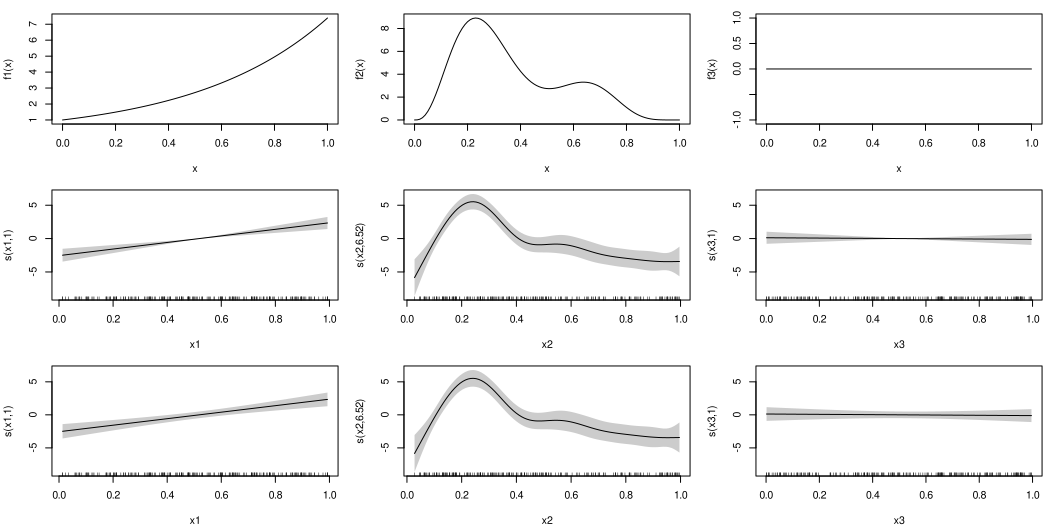<!-- --> --- # closer… 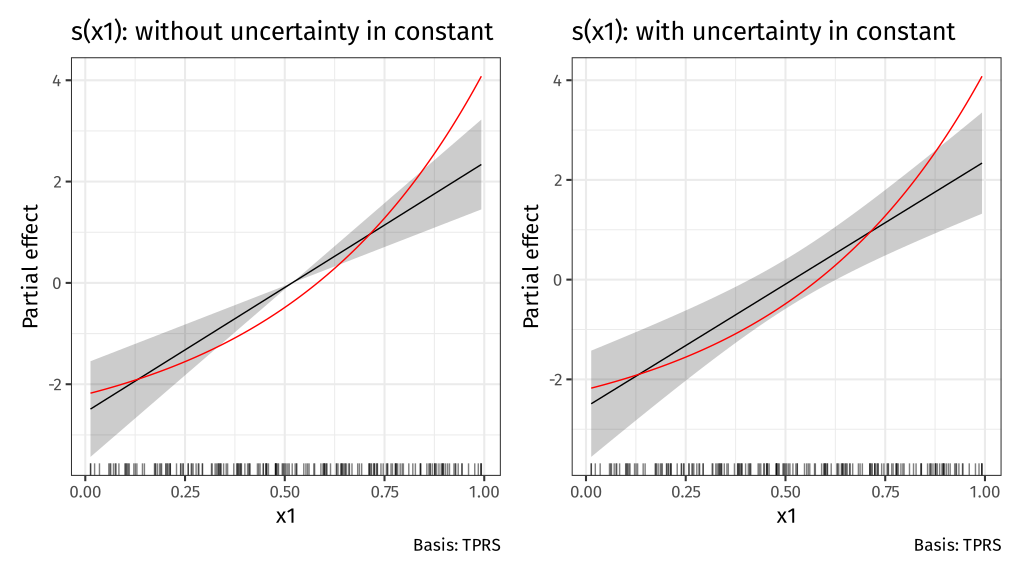<!-- --> --- # closer… 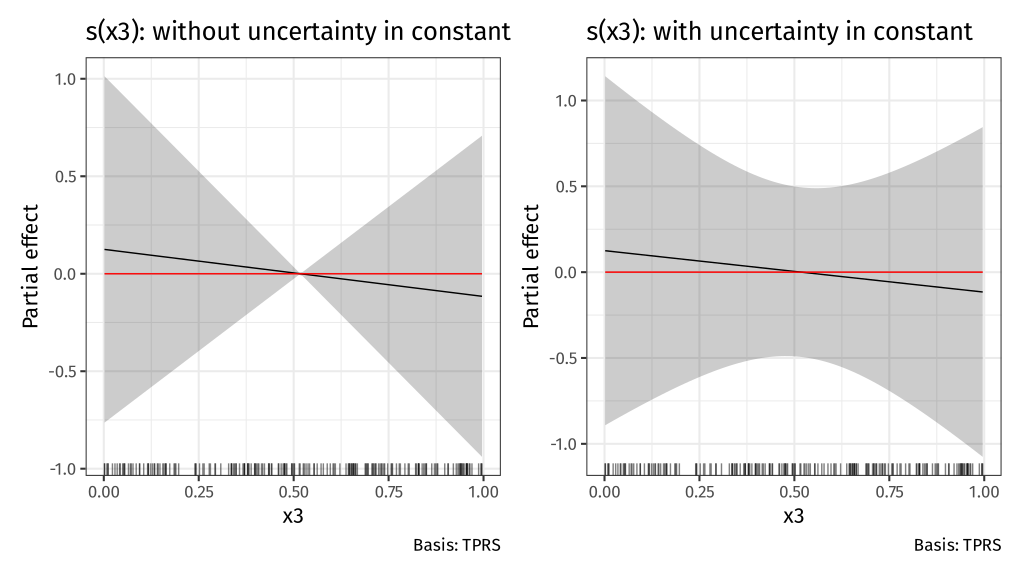<!-- --> --- # Confidence intervals for smooths Bands are a bayesian 95% credible interval on the smooth `plot.gam()` draws the band at ± **2** std. err. `gratia::draw()` draws them at `\((1 - \alpha) / 2\)` upper tail probability quantile of `\(\mathcal{N}(0,1)\)` `gratia::draw()` draws them at ~ ±**1.96** std. err. & user can change `\(\alpha\)` via argument `ci_level` -- So `gratia::draw()` draws them at ~ ±**2** st.d err --- # Across the function intervals The *frequentist* coverage of the intervals is not pointwise — instead these credible intervals have approximately 95% coverage when *averaged* over the whole function Some places will have more than 95% coverage, other places less -- Assumptions yielding this result can fail, where estimated smooth is a straight line -- Correct this with `seWithMean = TRUE` in `plot.gam()` or `overall_uncertainty = TRUE` in `gratia::draw()` This essentially includes the uncertainty in the intercept in the uncertainty band --- # Correcting for smoothness selection The defaults assume that the smoothness parameter(s) `\(\lambda_j\)` are *known* and *fixed* -- But we estimated them -- Can apply a correction for this extra uncertainty via argument `unconditional = TRUE` in both `plot.gam()` and `gratia::draw()` --- class: inverse center middle subsection # *p* values for smooths --- # Example .row[ .col-5[ Data has a known unrelated effect & 2 spurious effects .smaller[ ``` r m <- gam(y ~ s(x0) + s(x1) + s(x2) + s(x3) + s(x4) + s(x5), data = dat, method = "REML") summary(m) # ==> ``` ] ] .col-7[ .smaller[ ``` ## ## Family: gaussian ## Link function: identity ## ## Formula: ## y ~ s(x0) + s(x1) + s(x2) + s(x3) + s(x4) + s(x5) ## ## Parametric coefficients: ## Estimate Std. Error t value Pr(>|t|) ## (Intercept) 3.9300 0.1603 24.51 <2e-16 *** ## --- ## Signif. codes: 0 '***' 0.001 '**' 0.01 '*' 0.05 '.' 0.1 ' ' 1 ## ## Approximate significance of smooth terms: ## edf Ref.df F p-value ## s(x0) 2.336 2.919 2.181 0.0982 . ## s(x1) 2.312 2.862 17.105 <2e-16 *** ## s(x2) 7.093 8.128 16.402 <2e-16 *** ## s(x3) 1.403 1.697 0.218 0.8158 ## s(x4) 1.000 1.000 1.495 0.2230 ## s(x5) 1.000 1.000 2.994 0.0852 . ## --- ## Signif. codes: 0 '***' 0.001 '**' 0.01 '*' 0.05 '.' 0.1 ' ' 1 ## ## R-sq.(adj) = 0.511 Deviance explained = 54.8% ## -REML = 462.71 Scale est. = 5.1416 n = 200 ``` ] ] ] --- # *p* values for smooths *p* values for smooths are approximate: 1. they don't account for the estimation of `\(\lambda_j\)` — treated as known, hence *p* values are biased low 2. rely on asymptotic behaviour — they tend towards being right as sample size tends to `\(\infty\)` --- # *p* values for smooths ...are a test of **zero-effect** of a smooth term Default *p* values rely on theory of Nychka (1988) and Marra & Wood (2012) for confidence interval coverage If the Bayesian CI have good across-the-function properties, Wood (2013a) showed that the *p* values have - almost the correct null distribution - reasonable power Test statistic is a form of `\(\chi^2\)` statistic, but with complicated degrees of freedom --- # *p* values for fully penalized smooths The results of Nychka (1988) and Marra & Wood (2012) break down if smooth terms have no unpenalized terms This includes i.i.d. Gaussian random effects, (e.g. `bs = "re"`) Wood (2013b) proposed instead a test based on a likelihood ratio statistic: - the reference distribution used is appropriate for testing a `\(\mathrm{H}_0\)` on the boundary of the allowed parameter space... - ...in other words, it corrects for a `\(\mathrm{H}_0\)` that a variance term is zero --- # *p* values for smooths Have the best behaviour when smoothness selection is done using **ML**, then **REML**. Neither of these are the default, so remember to use `method = "ML"` or `method = "REML"` as appropriate --- # AIC for GAMs .small[ - Comparison of GAMs by a form of AIC is an alternative frequentist approach to model selection - *Marginal AIC* integrate out all random effects; over smooths - *Conditional AIC* keep everything at MAP estimates; use appropriate *df* for the random bits - Rather than using the marginal likelihood, the likelihood of the `\(\mathbf{\beta}_j\)` *conditional* upon `\(\lambda_j\)` is used, with the EDF replacing `\(k\)`, the number of model parameters - *Conditional* AIC tends to select complex models, especially those with random effects, as the EDF ignores that `\(\lambda_j\)` are estimated - Wood et al (2016) suggests a correction that accounts for uncertainty in `\(\lambda_j\)` `$$AIC = -2\mathcal{L}(\hat{\beta}) + 2\mathrm{tr}(\widehat{\mathcal{I}}V^{'}_{\beta})$$` ] --- # AIC for GAMs ``` r b0 <- gam(y ~ s(x0) + s(x1) + s(x2), data = dat, family = poisson, method = "REML") b1 <- gam(y ~ s(x0) + s(x1) + s(x2) + s(x3) + s(x4) + s(x5), data = dat, family = poisson, method = "REML", select = TRUE) b2 <- gam(y ~ s(x0) + s(x1) + s(x2) + s(x3) + s(x4) + s(x5), data = dat, family = poisson, method = "REML") ``` --- # AIC In this example, `\(x_3\)`, `\(x_4\)`, and `\(x_5\)` have no effects on `\(y\)` ``` r AIC(b0, b1, b2) ``` ``` ## df AIC ## b0 14.14062 841.5697 ## b1 14.36674 838.6076 ## b2 18.82059 842.1110 ``` When there is *no difference* in compared models, accepts larger model ~16% of the time: consistent with probability AIC chooses a model with 1 extra spurious parameter `\(Pr(\chi^2_1 > 2)\)` ``` r pchisq(2, 1, lower.tail = FALSE) ``` ``` ## [1] 0.1572992 ``` --- # Random effects When fitted with REML or ML, smooths can be viewed as just fancy random effects Inverse is true too; random effects can be viewed as smooths If you have simple random effects you can fit those in `gam()` and `bam()` without needing the more complex GAMM functions `gamm()` or `gamm4::gamm4()` These two models are equivalent ``` r m_nlme <- lme(travel ~ 1, data = Rail, ~ 1 | Rail, method = "REML") m_gam <- gam(travel ~ s(Rail, bs = "re"), data = Rail, method = "REML") ``` --- # Random effects — Rails Evaluation of Stress in Railway Rails. Data from Devore (2000) citing data on a study of travel time for a certain type of wave that results from longitudinal stress of rails used for railroad track. ``` r head(Rail) ``` ``` ## Grouped Data: travel ~ 1 | Rail ## Rail travel ## 1 1 55 ## 2 1 53 ## 3 1 54 ## 4 2 26 ## 5 2 37 ## 6 2 32 ``` .small[ Devore (2000) Probability and Statistics for Engineering and the Sciences (5th ed) ] --- # Random effects — Rails ``` r m_nlme <- lme(travel ~ 1, data = Rail, ~ 1 | Rail, method = "REML") m_gam <- gam(travel ~ s(Rail, bs = "re", k = 2), data = Rail, method = "REML") unlist(c(fixef(m_nlme), ranef(m_nlme))) ``` ``` ## (Intercept) (Intercept)1 (Intercept)2 (Intercept)3 (Intercept)4 (Intercept)5 ## 66.50000 -34.53091 -16.35675 -12.39148 16.02631 18.00894 ## (Intercept)6 ## 29.24388 ``` ``` r coef(m_gam) ``` ``` ## (Intercept) s(Rail).1 s(Rail).2 s(Rail).3 s(Rail).4 s(Rail).5 ## 66.50000 -34.53091 -16.35675 -12.39148 16.02631 18.00894 ## s(Rail).6 ## 29.24388 ``` --- # Variance components of smooths .row[ .col-6[ ``` r m_nlme ``` ``` ## Linear mixed-effects model fit by REML ## Data: Rail ## Log-restricted-likelihood: -61.0885 ## Fixed: travel ~ 1 ## (Intercept) ## 66.5 ## ## Random effects: ## Formula: ~1 | Rail ## (Intercept) Residual ## StdDev: 24.80547 4.020779 ## ## Number of Observations: 18 ## Number of Groups: 6 ``` ] .col-6[ ``` r variance_comp(m_gam) ``` ``` ## # A tibble: 2 × 5 ## .component .variance .std_dev .lower_ci .upper_ci ## <chr> <dbl> <dbl> <dbl> <dbl> ## 1 s(Rail) 615. 24.8 13.3 46.4 ## 2 scale 16.2 4.02 2.70 6.00 ``` ] ] --- # Penalty matrix for a random effect .row[ .col-7[ ``` r pm <- penalty(m_gam, smooth = "s(Rail)") draw(pm) ``` An identity matrix (1s on the diagonal) Penalty shrinks estimated coefs towards 0, the overal mean of `\(\mathbf{y}\)` Just like shrinkage in mixed effects model ] .col-5[ <img src="index_files/figure-html/re-basis-1.png" style="display: block; margin: auto;" /> ] ] --- # Random effects The random effect basis `bs = 're'` is not as computationally efficient as *nlme* or *lme4* for fitting * complex random effects terms, or * random effects with many levels Instead see `gamm()` and `gamm4::gamm4()` * `gamm()` fits using `lme()` * `gamm4::gamm4()` fits using `lmer()` or `glmer()` For non Gaussian models use `gamm4::gamm4()` --- class: inverse center middle subsection # HGAMs --- # Hierarchical models The general term encompassing * Random effects * Mixed effects * Mixed models * … Models are *hierarchical* because we have effects on the response at different scales Data are grouped in some way --- # Hierarchical GAMs Hierarchical GAMs or HGAMs are what we (Pedersen et al 2019 *PeerJ*) called the marriage of 1. Hierarchical GLMs (aka GLMMs, aka Hierarchical models) 2. GAMs Call them HGAMs if you want but these are really just *hierarchical models* There's nothing special HGAMs once we've created the basis functions --- # Hierarchical GAMs Pedersen et al (2019) *PeerJ* described 6 models <img src="resources/lawton-et-al-hgam-locust-paper-fig.svg" width="95%" style="display: block; margin: auto;" /> .small[Source: [Lawton *et al* (2022) *Ecography*](http://doi.org/10.1111/ecog.05763) modified from [Pedersen *et al* (2019) *PeerJ*](http://doi.org/10.7717/peerj.6876)] --- # Global effects What we called *global effects* or *global trends* are a bit like population-level effects in mixed-model speak They aren't quite, but they are pretty close to the average smooth effect over all the data Really these are *group-level effects* or *group-level effects* where data has multiple levels 1. "population", top level grouping (i.e. everything) 2. treatment level, 3. etc --- # Subject-specific effects Within these groups we have *subject-specific effects* — which could be smooth Repeated observations on a set of subjects over time say Those subjects may be within groups (treatment groups say) We may or may not have group-level (*global*; treatment) effects --- # Hierarchical GAMs These models are just different ways to decompose the data If there are common (non-linear) effects that explain variation for all subjects in a group it may be more parsimonious to * model those common effects plus subject-specific differences, instead of * modelling each subject-specific response individually --- class: inverse center middle subsection # Your turn --- # Chick weights exercise The exercise is at [chick-weights.html](https://gavinsimpson.github.io/physalia-gam-course/day-4/chick-weights.html) The Quarto file can be downloaded from here: [chick-weights.qmd](https://github.com/gavinsimpson/physalia-gam-course/raw/refs/heads/main/day-4/chick-weights.qmd) --- class: inverse center middle subsection # Example --- # Rat hormone experiment https://bit.ly/rat-hormone Study on the effects of testosterone on the growth of rats (Molenberghs and Verbeke, 2000) 50 rats randomly assigned to 1 of 3 groups: 1. a control group 2. a group receiving low doses of Decapeptyl 3. a high Decapeptyl dose group Decapeptyl inhibits the production of testosterone Experiment started (day 1) when rats were 45 days old and from day 50 the size of each rat's head was measured via an x-ray image ??? By way of an example, I'm going to use a data set from a study on the effects of testosterone on the growth of rats from Molenberghs and Verbeke (2000), which was analysed in Fahrmeir et al. (2013), from were I also obtained the data. In the experiment, 50 rats were randomly assigned to one of three groups; a control group or a group receiving low or high doses of Decapeptyl, which inhibits testosterone production. The experiment started when the rats were 45 days old and starting with the 50th day, the size of the rat's head was measured via an X-ray image. You can download the data. --- # Rat hormone experiment 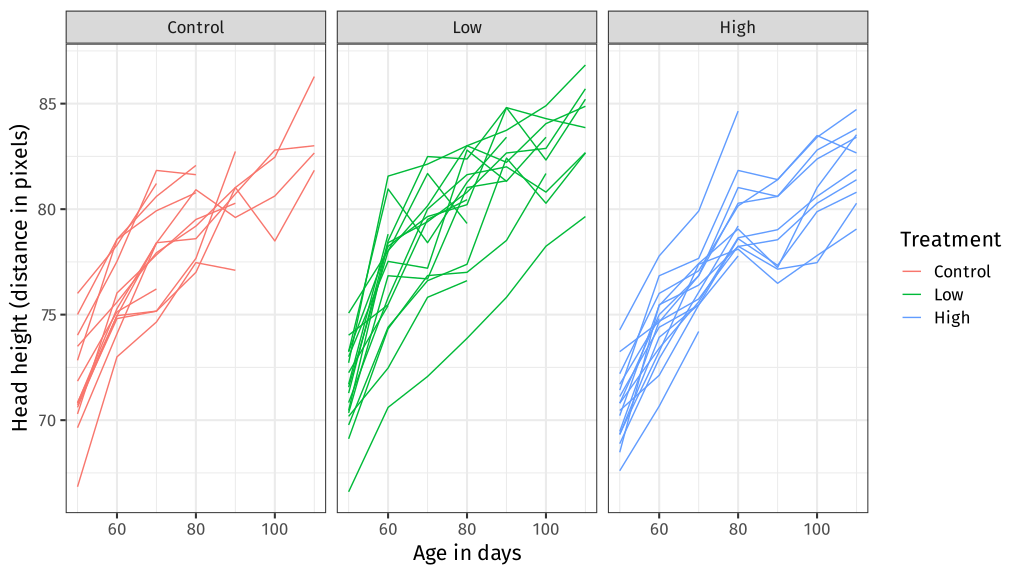<!-- --> --- # Rat hormone experiment To linearise the `time` variable, a transformation was applied `$$\mathtt{transf\_time} = \log (1 + (\mathtt{time} - 45) / 10)$$` The number of observations per rat is very variable ``` ## # A tibble: 7 × 2 ## n n_rats ## <int> <int> ## 1 1 4 ## 2 2 3 ## 3 3 5 ## 4 4 9 ## 5 5 5 ## 6 6 2 ## 7 7 22 ``` Only 22 of the 50 rats have the complete 7 measurements by day 110 --- # Rat hormone experiment The model fitted in Fahrmeir *et al* (2013) is `$$y_{ij} = \alpha + \gamma_{0i} + \beta_1 L_i \cdot t_{ij} + \beta_2 H_i \cdot t_{ij} + \beta_3 C_i \cdot t_{ij} + \gamma_{1i} \cdot t_{ij} + \varepsilon_{ij}$$` where * `\(\alpha\)` is the population mean of the response at the start of the treatment * `\(L_i\)`, `\(H_i\)`, `\(C_i\)` are dummy variables coding for each treatment group * `\(\gamma_{0i}\)` is the rat-specific mean (random intercept) * `\(\gamma_{qi} \cdot t_{ij}\)` is the rat-specific effect of `transf_time` (random slope) Code to fit this model in `lmer()` and `gam()` is in `day-4/rat-hormone-example.R`. HGAM equivalent is in `day-4/rat-hormone-hgam-example.R` ??? If this isn't very clear --- it took me a little while to grok what this meant and translate it to R speak --- note that each of `\(\beta_1\)`, `\(\beta_2\)`, and `\(\beta_3\)` are associated with an interaction between the dummy variable coding for the treatment and the time variable. So we have a model with an intercept and three interaction terms with no "main" effects. --- # Rat hormone experiment The main problem with HGAMs is that there are so many combinations over smooth types that you could use: - which type of factor smoothing? - should I allow for the same wiggliness or different wiggliness over the levels of the factor? Compounds as the number of levels of hierarchy increases The solution is to **stop** and think — you don't need to fit all the possible models Fit a maximal model that covers your hypotheses and then test assumptions of same *vs.* different wiggliness --- class: inverse center middle subsection # Posteriors and prediction --- # 🐡🐠🐟🦐 Species richness & 🦐 biomass The example comes from trawl data from off the coast of Newfoundland and Labrador, Canada * Counts of species richness at each trawl location * Shrimp biomass at each trawl location * Annual trawls 2005–2014 --- # 🐡🐠🐟🦐 Species richness .row[ .col-6[ ``` r shrimp <- read.csv(here("data", "trawl_nl.csv")) ``` ``` r m_rich <- gam(richness ~ s(year), family = poisson, method = "REML", data = shrimp) ``` ] .col-6[ 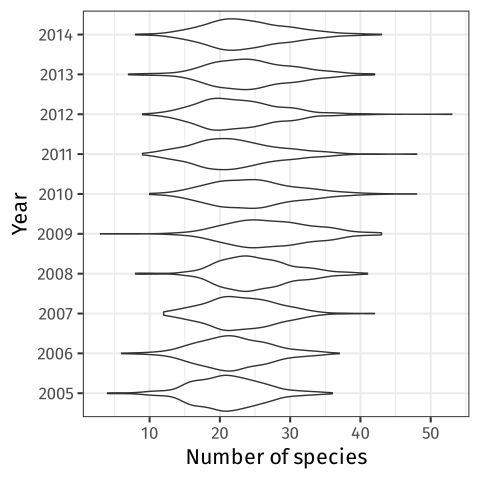<!-- --> ] ] --- # 🐡🐠🐟🦐 Species richness ``` r draw(m_rich) ``` <img src="index_files/figure-html/draw-richness-gam-1.svg" width="90%" style="display: block; margin: auto;" /> --- # Spatio-temporal data 🦐 biomass at each trawl 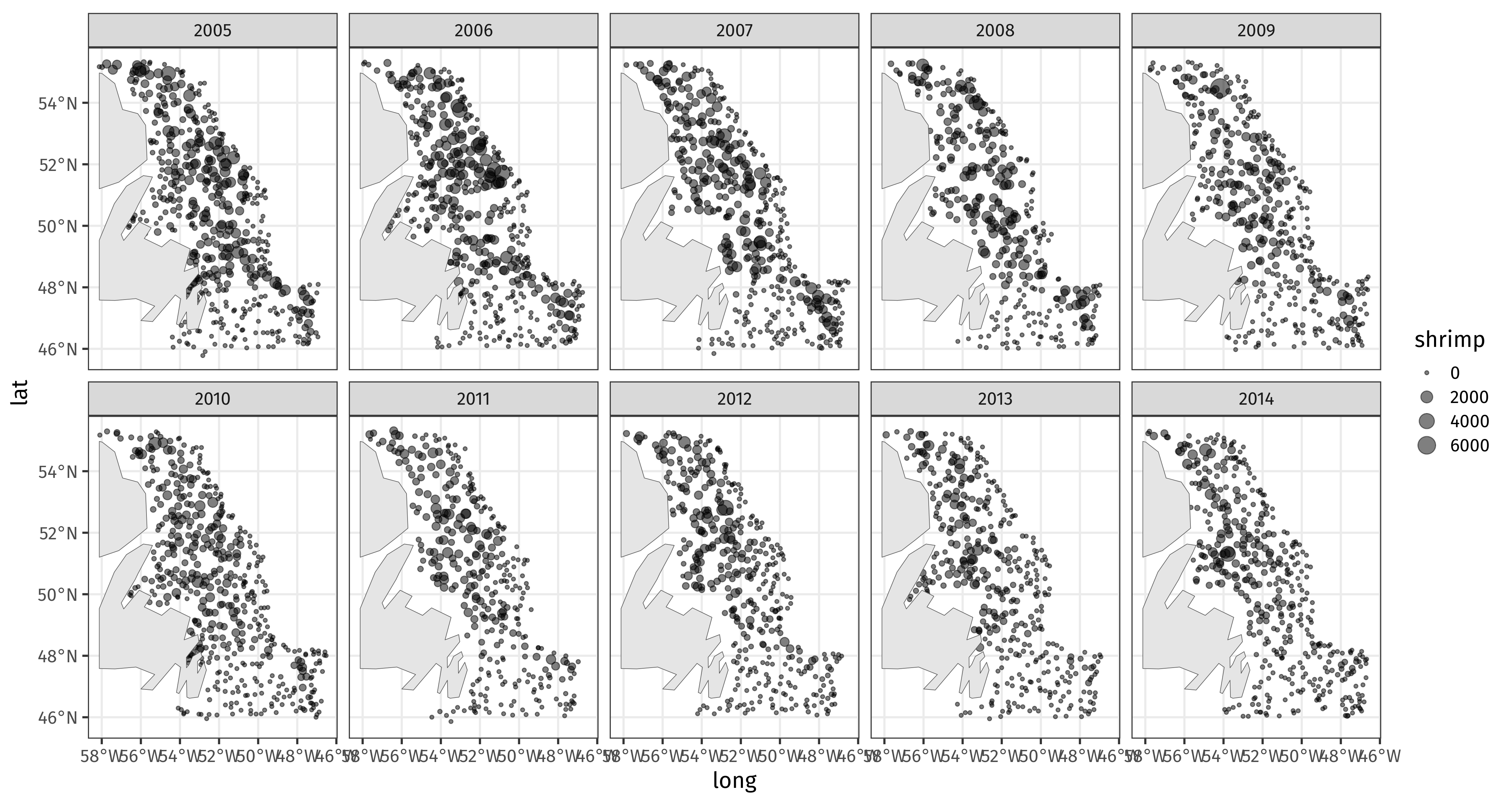<!-- --> --- # Spatio-temporal model ``` r m_spt <- gam(shrimp ~ te(x, y, year, d = c(2,1), bs = c('tp', 'cr'), k = c(20, 5)), data = shrimp, family = tw(), method = "REML") ``` --- # Predicting with `predict()` `plot.gam()` and `gratia::draw()` show the component functions of the model on the link scale Prediction allows us to evaluate the model at known values of covariates on the response scale Use the standard function `predict()` Provide `newdata` with a data frame of values of covariates --- # `predict()` ``` r new_year <- with(shrimp, tibble(year = seq(min(year), max(year), length.out = 100))) pred <- predict(m_rich, newdata = new_year, se.fit = TRUE, type = 'link') pred <- bind_cols(new_year, as_tibble(as.data.frame(pred))) pred ``` ``` ## # A tibble: 100 × 3 ## year fit se.fit ## <dbl> <dbl> <dbl> ## 1 2005 3.05 0.0100 ## 2 2005. 3.05 0.00901 ## 3 2005. 3.06 0.00830 ## 4 2005. 3.06 0.00792 ## 5 2005. 3.06 0.00786 ## 6 2005. 3.06 0.00807 ## 7 2006. 3.07 0.00844 ## 8 2006. 3.07 0.00887 ## 9 2006. 3.07 0.00926 ## 10 2006. 3.08 0.00955 ## # ℹ 90 more rows ``` --- # `predict()` → response scale ``` r ilink <- inv_link(m_rich) # inverse link function crit <- qnorm((1 - 0.89) / 2, lower.tail = FALSE) # or just `crit <- 2` pred <- mutate(pred, richness = ilink(fit), lwr = ilink(fit - (crit * se.fit)), # lower... upr = ilink(fit + (crit * se.fit))) # upper credible interval pred ``` ``` ## # A tibble: 100 × 6 ## year fit se.fit richness lwr upr ## <dbl> <dbl> <dbl> <dbl> <dbl> <dbl> ## 1 2005 3.05 0.0100 21.1 20.8 21.4 ## 2 2005. 3.05 0.00901 21.2 20.9 21.5 ## 3 2005. 3.06 0.00830 21.2 20.9 21.5 ## 4 2005. 3.06 0.00792 21.3 21.0 21.6 ## 5 2005. 3.06 0.00786 21.4 21.1 21.6 ## 6 2005. 3.06 0.00807 21.4 21.1 21.7 ## 7 2006. 3.07 0.00844 21.5 21.2 21.8 ## 8 2006. 3.07 0.00887 21.6 21.3 21.9 ## 9 2006. 3.07 0.00926 21.6 21.3 22.0 ## 10 2006. 3.08 0.00955 21.7 21.4 22.0 ## # ℹ 90 more rows ``` --- # `predict()` → plot Tidy objects like this are easy to plot with `ggplot()` ``` r ggplot(pred, aes(x = year)) + scale_x_continuous(breaks = 2005:2014) + geom_ribbon(aes(ymin = lwr, ymax = upr), alpha = 0.2) + geom_line(aes(y = richness)) + labs(y = "Species richness", x = NULL) ``` 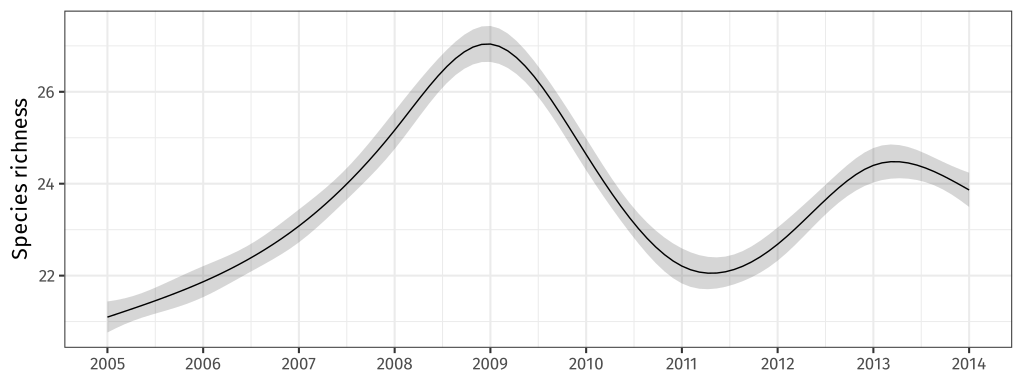<!-- --> --- # `predict()` for space and time This idea is very general; spatiotemporal model needs a grid of x,y coordinates for each year ``` r sp_new <- with(shrimp, expand.grid(x = evenly(x, n = 100), y = evenly(y, n = 100), year = unique(year))) sp_pred <- predict(m_spt, newdata = sp_new, se.fit = TRUE) # link scale is default sp_pred <- bind_cols(as_tibble(sp_new), as_tibble(as.data.frame(sp_pred))) sp_pred ``` ``` ## # A tibble: 100,000 × 5 ## x y year fit se.fit ## <dbl> <dbl> <int> <dbl> <dbl> ## 1 428238. 5078244. 2005 3.34 1.06 ## 2 436886. 5078244. 2005 3.32 1.06 ## 3 445535. 5078244. 2005 3.31 1.05 ## 4 454183. 5078244. 2005 3.29 1.04 ## 5 462831. 5078244. 2005 3.26 1.03 ## 6 471479. 5078244. 2005 3.24 1.02 ## 7 480127. 5078244. 2005 3.21 1.01 ## 8 488775. 5078244. 2005 3.18 1.00 ## 9 497423. 5078244. 2005 3.15 0.994 ## 10 506071. 5078244. 2005 3.12 0.985 ## # ℹ 99,990 more rows ``` --- # `predict()` → response scale ``` r ilink <- inv_link(m_spt) too_far <- exclude.too.far(sp_pred$x, sp_pred$y, shrimp$x, shrimp$y, dist = 0.1) sp_pred <- sp_pred %>% mutate(biomass = ilink(fit), biomass = case_when(too_far ~ NA_real_, TRUE ~ biomass)) sp_pred ``` ``` ## # A tibble: 100,000 × 6 ## x y year fit se.fit biomass ## <dbl> <dbl> <int> <dbl> <dbl> <dbl> ## 1 428238. 5078244. 2005 3.34 1.06 NA ## 2 436886. 5078244. 2005 3.32 1.06 NA ## 3 445535. 5078244. 2005 3.31 1.05 NA ## 4 454183. 5078244. 2005 3.29 1.04 NA ## 5 462831. 5078244. 2005 3.26 1.03 NA ## 6 471479. 5078244. 2005 3.24 1.02 NA ## 7 480127. 5078244. 2005 3.21 1.01 NA ## 8 488775. 5078244. 2005 3.18 1.00 NA ## 9 497423. 5078244. 2005 3.15 0.994 NA ## 10 506071. 5078244. 2005 3.12 0.985 NA ## # ℹ 99,990 more rows ``` --- # `predict()` → plot ``` r ggplot(sp_pred, aes(x = x, y = y, fill = biomass)) + geom_raster() + scale_fill_viridis_c(option = "plasma") + facet_wrap(~ year, ncol = 5) + coord_equal() ``` 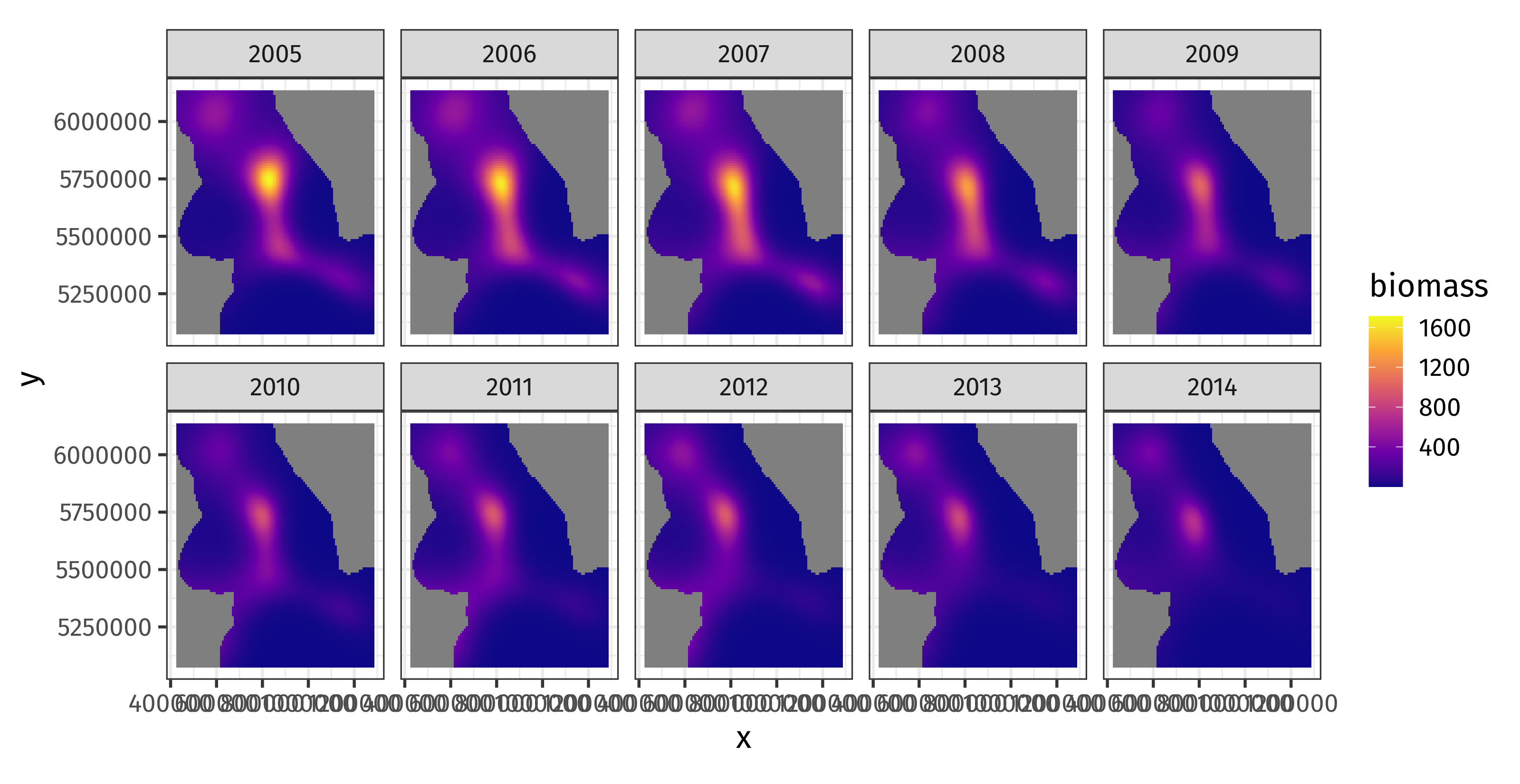<!-- --> --- # Visualizing the trend? We have this model .smaller[ ``` r m_spt ``` ``` ## ## Family: Tweedie(p=1.686) ## Link function: log ## ## Formula: ## shrimp ~ te(x, y, year, d = c(2, 1), bs = c("tp", "cr"), k = c(20, ## 5)) ## ## Estimated degrees of freedom: ## 70.4 total = 71.38 ## ## REML score: 19102.91 ``` ] How would you visualize the average change in biomass over time? --- # Welcome back old friend One way is to decompose the spatio-temporal function in main effects plus interaction ``` r m_ti <- gam(shrimp ~ ti(x, y, year, d = c(2, 1), bs = c("tp", "cr"), k = c(20, 5)) + s(x, y, bs = "tp", k = 20) + s(year, bs = "cr", k = 5), data = shrimp, family = tw, method = "REML") ``` and predict from the model using only the marginal effect of `s(year)` --- # `predict()` with `exclude` .row[ .col-6[ We can exclude the spatial & spatiotemporal terms from predictions using `exclude` **Step 1** run `gratia::smooths()` on model & note the names of the smooth you *don't* want → ] .col-6[ .smaller[ ``` r smooths(m_ti) ``` ``` ## [1] "ti(x,y,year)" "s(x,y)" "s(year)" ``` ] ] ] --- # `predict()` with `exclude` — Step 2 *predict* Prediction data only need dummy values for `x` and `y` ``` r ti_new <- with(shrimp, expand.grid(x = mean(x), y = mean(y), year = evenly(year, n = 100))) ti_pred <- predict(m_ti, newdata = ti_new, se.fit = TRUE, * exclude = c("ti(x,y,year)", "s(x,y)")) ti_pred <- bind_cols(as_tibble(ti_new), as_tibble(as.data.frame(ti_pred))) %>% mutate(biomass = ilink(fit), lwr = ilink(fit - (crit * se.fit)), upr = ilink(fit + (crit * se.fit))) ``` `exclude` takes a character vector of terms to exclude — `predict()` sets the contributions of those terms to 0 Could also use `terms = "s(year)"` to select only the named smooths ``` r predict(m_ti, newdata = ti_new, se.fit = TRUE, terms = "s(year)") ``` --- # `predict()` with `exclude`— Step 3 *plot it!* ``` r ggplot(ti_pred, aes(x = year)) + geom_ribbon(aes(ymin = lwr, ymax = upr), alpha = 0.3) + geom_line(aes(y = biomass)) + labs(y = "Biomass", x = NULL) ``` 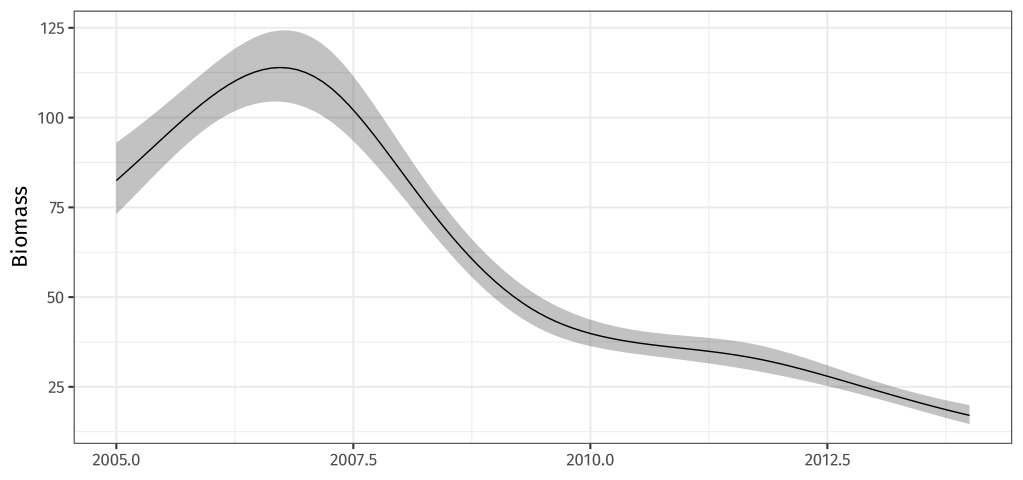<!-- --> --- # Using `fitted_values()` ``` r ti_pred2 <- fitted_values(m_ti, data = ti_new, scale = "response", * exclude = c("ti(x,y,year)", "s(x,y)")) ggplot(ti_pred2, aes(x = year)) + geom_ribbon(aes(ymin = .lower_ci, ymax = .upper_ci), alpha = 0.3) + geom_line(aes(y = .fitted)) + labs(y = "Biomass", x = NULL) ``` <img src="index_files/figure-html/predict-via-fitted-values-1.svg" width="70%" style="display: block; margin: auto;" /> --- class: inverse middle center subsection # Posterior simulation --- # Remember this? .center[ <img src="resources/miller-bayesian-gam-interpretation-fig.svg" width="80%" /> ] .smaller[ Miller (2021) Bayesian Views of Generalized Additive Modelling. [*arXiv*:1902.01330v3](http://arxiv.org/abs/1902.01330v3) ] -- Where did the faint grey lines come from? --- # Posterior distributions Each line is a draw from the *posterior distribution* of the smooth Remember the coefficients for each basis function?: `\(\beta_j\)` Together they are distributed *multivariate normal* with * mean vector given by `\(\hat{\beta}_j\)` * covariance matrix `\(\boldsymbol{\hat{V}}_{\beta}\)` `$$\text{MVN}(\boldsymbol{\hat{\beta}}, \boldsymbol{\hat{V}}_{\beta})$$` -- The model as a whole has a posterior distribution too -- We can simulate data from the model by taking draws from the posterior distribution --- # Posterior simulation for a smooth Sounds fancy but it's only just slightly more complicated than using `rnorm()` To do this we need a few things: 1. The vector of model parameters for the smooth, `\(\boldsymbol{\hat{\beta}}\)` 2. The covariance matrix of those parameters, `\(\boldsymbol{\hat{V}}_{\beta}\)` 3. A matrix `\(\boldsymbol{X}_p\)` that maps parameters to the linear predictor for the smooth `$$\boldsymbol{\hat{\eta}}_p = \boldsymbol{X}_p \boldsymbol{\hat{\beta}}$$` -- Let's do this for `m_rich` --- # Posterior sim for a smooth — step 1 The vector of model parameters for the smooth, `\(\boldsymbol{\hat{\beta}}\)` ``` r sm_year <- get_smooth(m_rich, "s(year)") # extract the smooth object from model idx <- gratia:::smooth_coef_indices(sm_year) # indices of the coefs for this smooth idx ``` ``` ## [1] 2 3 4 5 6 7 8 9 10 ``` ``` r beta <- coef(m_rich) # vector of model parameters beta[idx] # coefs for this smooth ``` ``` ## s(year).1 s(year).2 s(year).3 s(year).4 s(year).5 s(year).6 ## -0.17559264 1.13222927 -0.46532056 5.90630566 0.18400060 -1.09147043 ## s(year).7 s(year).8 s(year).9 ## -0.20021520 -0.44434784 -0.02398653 ``` --- # Posterior sim for a smooth — step 2 The covariance matrix of the model parameters, `\(\boldsymbol{\hat{V}}_{\beta}\)` ``` r Vb <- vcov(m_rich) # default is the bayesian covariance matrix Vb ``` .small[ ``` ## (Intercept) s(year).1 s(year).2 s(year).3 s(year).4 s(year).5 s(year).6 s(year).7 s(year).8 s(year).9 ## (Intercept) 1.027059e-05 1.578864e-06 -9.032418e-06 -1.307231e-06 -4.622411e-05 -9.668346e-06 1.481563e-05 8.523791e-07 4.057120e-06 7.715888e-08 ## s(year).1 1.578864e-06 4.766242e-02 -1.705627e-01 1.280727e-01 -1.447873e-01 2.579066e-02 -7.928522e-02 1.444655e-02 3.437523e-02 6.254985e-03 ## s(year).2 -9.032418e-06 -1.705627e-01 7.441849e-01 -6.341764e-01 9.230513e-01 -3.008818e-01 5.476052e-01 -1.972615e-01 -1.370834e-01 -2.260069e-02 ## s(year).3 -1.307231e-06 1.280727e-01 -6.341764e-01 1.756373e+00 -1.488830e+00 8.995848e-01 2.440806e-02 -2.444633e-01 6.839307e-03 -2.921669e-03 ## s(year).4 -4.622411e-05 -1.447873e-01 9.230513e-01 -1.488830e+00 2.743191e+00 -2.018595e+00 1.612778e+00 -5.371137e-01 -1.362334e-01 -1.741728e-02 ## s(year).5 -9.668346e-06 2.579066e-02 -3.008818e-01 8.995848e-01 -2.018595e+00 2.276558e+00 -1.671047e+00 5.120318e-01 3.881950e-02 -4.407525e-03 ## s(year).6 1.481563e-05 -7.928522e-02 5.476052e-01 2.440806e-02 1.612778e+00 -1.671047e+00 2.357642e+00 -1.045468e+00 -1.807873e-01 -1.797243e-02 ## s(year).7 8.523791e-07 1.444655e-02 -1.972615e-01 -2.444633e-01 -5.371137e-01 5.120318e-01 -1.045468e+00 5.391215e-01 8.494867e-02 8.167830e-03 ## s(year).8 4.057120e-06 3.437523e-02 -1.370834e-01 6.839307e-03 -1.362334e-01 3.881950e-02 -1.807873e-01 8.494867e-02 3.836358e-02 6.579738e-03 ## s(year).9 7.715888e-08 6.254985e-03 -2.260069e-02 -2.921669e-03 -1.741728e-02 -4.407525e-03 -1.797243e-02 8.167830e-03 6.579738e-03 1.683112e-03 ``` ] --- # Posterior sim for a smooth — step 3 A matrix `\(\boldsymbol{X}_p\)` that maps parameters to the linear predictor for the smooth We get `\(\boldsymbol{X}_p\)` using the `predict()` method with `type = "lpmatrix"` ``` r new_year <- with(shrimp, tibble(year = evenly(year, n = 100))) Xp <- predict(m_rich, newdata = new_year, type = 'lpmatrix') dim(Xp) ``` ``` ## [1] 100 10 ``` --- # Posterior sim for a smooth — step 4 Take only the columns of `\(\boldsymbol{X}_p\)` that are involved in the smooth of `year` ``` r Xp <- Xp[, idx, drop = FALSE] dim(Xp) ``` ``` ## [1] 100 9 ``` --- # Posterior sim for a smooth — step 5 Simulate parameters from the posterior distribution of the smooth of `year` ``` r set.seed(42) beta_sim <- rmvn(n = 20, beta[idx], Vb[idx, idx, drop = FALSE]) dim(beta_sim) ``` ``` ## [1] 20 9 ``` Simulating many sets (20) of new model parameters from the estimated parameters and their uncertainty (covariance) Result is a matrix where each row is a set of new model parameters, each consistent with the fitted smooth --- # Posterior sim for a smooth — step 6 .row[ .col-6[ Form `\(\boldsymbol{\hat{\eta}}_p\)`, the posterior draws for the smooth ``` r sm_draws <- Xp %*% t(beta_sim) dim(sm_draws) ``` ``` ## [1] 100 20 ``` ``` r matplot(sm_draws, type = 'l') ``` A bit of rearranging is needed to plot with `ggplot()` ] .col-6[ 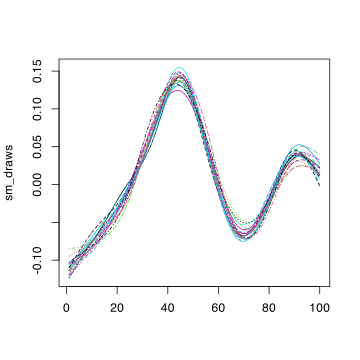<!-- --> ] ] -- Or use `smooth_samples()` --- # Posterior sim for a smooth — steps 1–6 ``` r sm_post <- smooth_samples(m_rich, 's(year)', n = 20, seed = 42) draw(sm_post) ``` 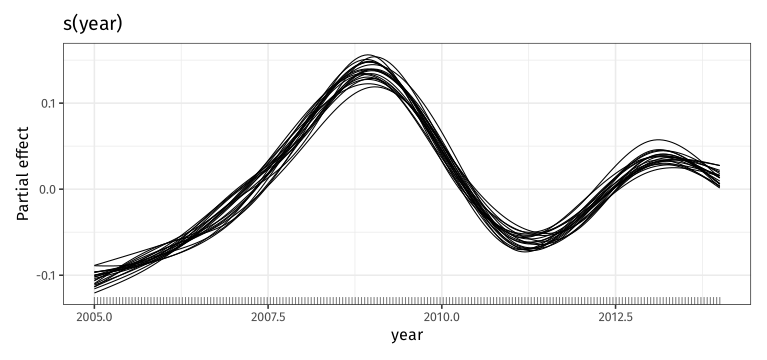<!-- --> --- # Posterior simulation from the model Simulating from the posterior distribution of the model requires 1 modification of the recipe for a smooth and one extra step We want to simulate new values for all the parameters in the model, not just the ones involved in a particular smooth -- Additionally, we could simulate *new response data* from the model and the simulated parameters (**not shown** below) --- # Posterior simulation from the model ``` r beta <- coef(m_rich) # vector of model parameters Vb <- vcov(m_rich) # default is the bayesian covariance matrix Xp <- predict(m_rich, type = "lpmatrix") set.seed(42) beta_sim <- rmvn(n = 1000, beta, Vb) # simulate parameters eta_p <- Xp %*% t(beta_sim) # form linear predictor values mu_p <- inv_link(m_rich)(eta_p) # apply inverse link function mean(mu_p[1, ]) # mean of posterior for the first observation in the data ``` ``` ## [1] 21.10123 ``` ``` r quantile(mu_p[1, ], probs = c(0.025, 0.975)) ``` ``` ## 2.5% 97.5% ## 20.70134 21.49528 ``` --- # Posterior simulation from the model ``` r ggplot(tibble(richness = mu_p[587, ]), aes(x = richness)) + geom_histogram() + labs(title = "Posterior richness for obs #587") ``` 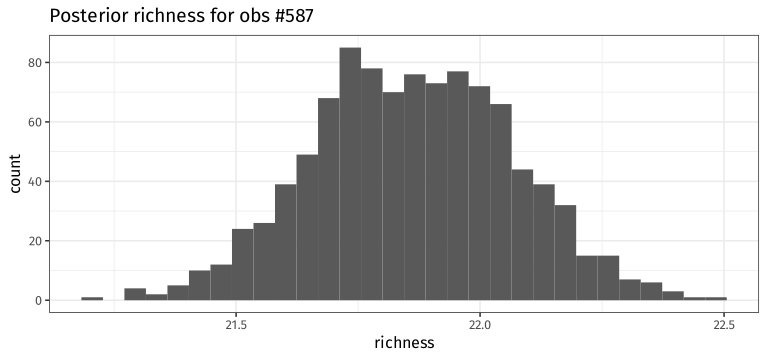<!-- --> --- # Posterior simulation from the model Or easier using `fitted_samples()` ``` r rich_post <- fitted_samples(m_rich, n = 1000, data = shrimp, seed = 42) ggplot(filter(rich_post, .row == 587), aes(x = .fitted)) + geom_histogram() + labs(title = "Posterior richness for obs #587", x = "Richness") ``` 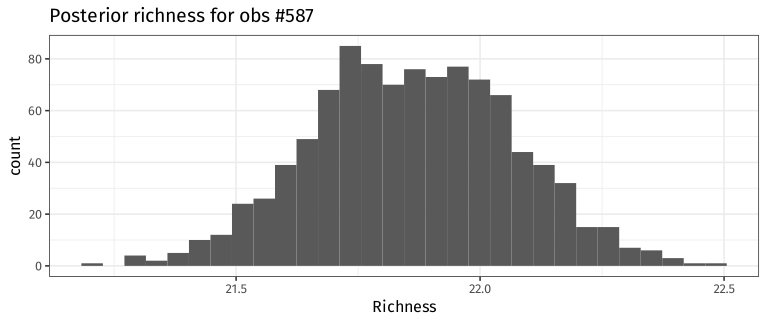<!-- --> --- # Why is this of interest? Say you wanted to get an estimate for the total biomass of shrimp over the entire region of the trawl survey for 2007 You could predict for the spatial grid for `year == 2007` using code shown previously and sum the predicted biomass values over all the grid cells -- **Easy** -- But what if you also wanted the uncertainty in that estimate? -- **Hard** -- **Math** 😱😱 "something, something, delta method, something" 😱😱 --- # Posterior simulation makes this easy 1. Take a draw from the posterior distribution of the model 2. Use the posterior draw to predict biomass for each grid cell 3. Sum the predicted biomass values over all grid cells 4. Store the total biomass value 5. Repeat 1–4 a lot of times to get posterior distribution for total biomass 6. Summarize the total biomass posterior * Estimated total biomass is the mean of the total biomass posterior * Uncertainty is some lower/upper tail probability quantiles of the posterior --- # Let's do it ``` r sp_new <- with(shrimp, expand.grid(x = evenly(x, n = 100), y = evenly(y, n = 100), year = 2007)) Xp <- predict(m_spt, newdata = sp_new, type = "lpmatrix") ## work out now which points are too far now too_far <- exclude.too.far(sp_new$x, sp_new$y, shrimp$x, shrimp$y, dist = 0.1) beta <- coef(m_spt) # vector of model parameters Vb <- vcov(m_spt) # default is the bayesian covariance matrix set.seed(42) beta_sim <- rmvn(n = 1000, beta, Vb) # simulate parameters eta_p <- Xp %*% t(beta_sim) # form linear predictor values mu_p <- inv_link(m_spt)(eta_p) # apply inverse link function ``` Columns of `mu_p` contain the expected or mean biomass for each grid cell per area trawled Sum the columns of `mu_p` and summarize --- # Summarize the expected biomass ``` r mu_copy <- mu_p # copy mu_p mu_copy[too_far, ] <- NA # set cells too far from data to be NA total_biomass <- colSums(mu_copy, na.rm = TRUE) # total biomass over the region mean(total_biomass) ``` ``` ## [1] 1561644 ``` ``` r quantile(total_biomass, probs = c(0.025, 0.975)) ``` ``` ## 2.5% 97.5% ## 1404871 1750293 ``` --- # Summarize the expected biomass 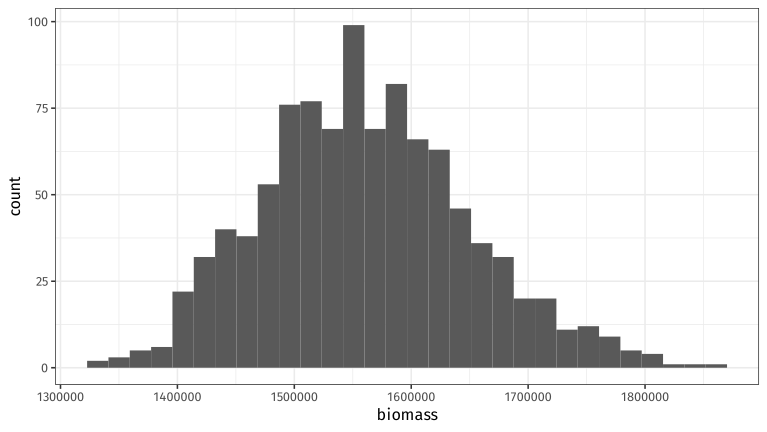<!-- --> --- # With `fitted_samples()` .row[ .col-7[ ``` r bio_post <- fitted_samples(m_spt, n = 1000, data = sp_new[!too_far, ], seed = 42) %>% group_by(.draw) %>% summarise(total = sum(.fitted), .groups = "drop_last") with(bio_post, mean(total)) ``` ``` ## [1] 1561644 ``` ``` r with(bio_post, quantile(total, probs = c(0.025, 0.975))) ``` ``` ## 2.5% 97.5% ## 1404871 1750293 ``` ] .col-5[ ``` r ggplot(bio_post, aes(x = total)) + geom_histogram() + labs(x = "Total biomass") ``` 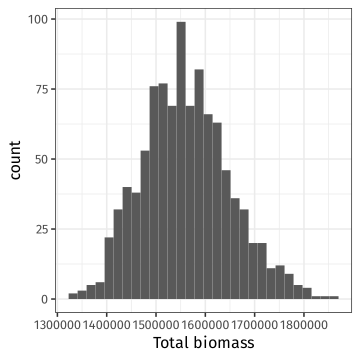<!-- --> ] ] --- class: inverse middle center subsection # Example --- # Max species abundance We have measurements of the abundance of a particular species along an environmental gradient ``` r spp_url <- "https://bit.ly/spp-gradient" gradient <- read_csv(spp_url, col_types = "dd") gradient ``` ``` ## # A tibble: 100 × 2 ## abundance environment ## <dbl> <dbl> ## 1 0 1 ## 2 1 2 ## 3 3 3 ## 4 8 4 ## 5 4 5 ## 6 12 6 ## 7 15 7 ## 8 13 8 ## 9 11 9 ## 10 15 10 ## # ℹ 90 more rows ``` --- # Max species abundance Tasks 1. fit a suitable GAM (the data are counts) 2. estimate the value of the environmental gradient where the species reaches its maximal abundance and use *posterior simulation* to provide an uncertainty estimate for this value --- # Addendum We used a *Gaussian approximation* to the model posterior distribution This works well for many models but it's an approximation and can fail when the posterior is far from Gaussian Other options include 1. using integrated nested Laplace approximation `mgcv::ginla()` 2. using a Metropolis Hastings sampler `mgcv::gam.mh()` See `?mgcv::gam.mh` for an example where Gaussian approximation fails badly -- `fitted_samples()`, `smooth_samples()` etc default to Gaussian approximation, but the Metropolis Hastings sampler is now an option in the released version --- class: inverse center middle subsection # Temporally ordered data --- # Smoothing autocorrelated data Smoothing temporally autocorrelated data can `-->` over fitting .row[ .col-6[ `\(y\)` is contaminated with AR(1) noise .smaller[ ``` r set.seed(321) n <- 100 time <- 1:n xt <- time/n Y <- (1280 * xt^4) * (1- xt)^4 y <- as.numeric(Y + arima.sim(list(ar = 0.3713), n = n)) df <- tibble(y = y, time = time, f = Y) # plot plt <- ggplot(df, aes(x = time, y = y)) + geom_point() + geom_line(aes(y = f), col = "steelblue", lwd = 2) plt ``` ] ] .col-6[ 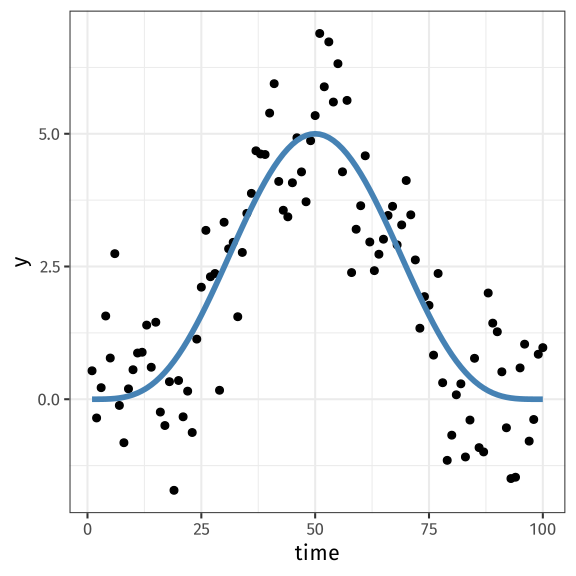<!-- --> ] ] --- # Smoothing autocorrelated data .row[ .col-6[ .smaller[ ``` r # standard fit m_reml <- gam(y ~ s(time, k = 20), data = df, method = "REML") # use GCV m_gcv <- gam(y ~ s(time, k = 20), data = df) # fitted values fv_reml <- fitted_values(m_reml) fv_gcv <- fitted_values(m_gcv) # plot plt + geom_line(data = fv_reml, aes(x = time, y = .fitted), col = "red") + geom_line(data = fv_gcv, aes(x = time, y = .fitted), col = "darkgreen") ``` ] ] .col-6[ 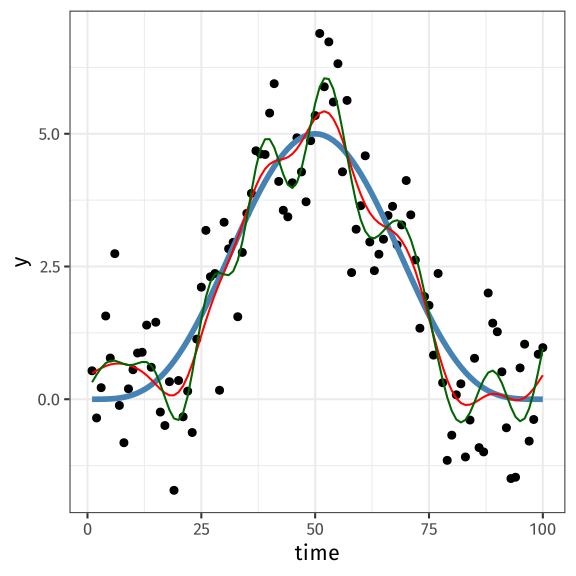<!-- --> ] ] --- # Smoothing autocorrelated data What about smoothing where `\(x\)` is time? Is this still a problem? -- Yes *and* No -- Depends on how you want to decompose *time* again --- # Temporal dependence Temporal dependence really means that observations that are close together in time tend to be similar to one another than observations well separated in time How similar depends on the memory length of the system -- Strong dependence — high autocorrelatation &,dash; long memory Weak dependence — low autocorrelatation &,dash; short memory --- # Temporal dependence What does a GAM say about our data? -- It says that observations near to one another (in covariate space) are more similar than observations further apart --- # Temporal dependence & GAMs From this perspective then Wiggly smooths = Strong dependence Smooth (!) smooths = Weak dependence --- # Temporal dependence & GAMs If you don't like your trend to be that wiggly, what to do? -- You could decompose the temporal effect into a smooth trend *plus* an autocorrelated process in the `\(\varepsilon\)` -- That process could be ARMA(*p*, *q*) or a continuous time AR(1) -- Fit with `gamm()` using `correlation` argument, or `bam()` (AR(1) only) --- # Smoothing autocorrelated data — `gamm()` .row[ .col-6[ .smaller[ ``` r # standard fit m_ar1 <- gamm(y ~ s(time, k = 20), data = df, correlation = corAR1(form = ~ 1), #<-- method = "REML") # fitted values fv_ar1 <- fitted_values(m_ar1$gam) # plot gamm_plt <- plt + geom_ribbon(data = fv_ar1, aes(ymin = .lower_ci, ymax = .upper_ci, y = NULL), alpha = 0.2, fill = "hotpink") + geom_line(data = fv_ar1, aes(x = time, y = .fitted), col = "hotpink", lwd = 1.5) gamm_plt ``` ] ] .col-6[ 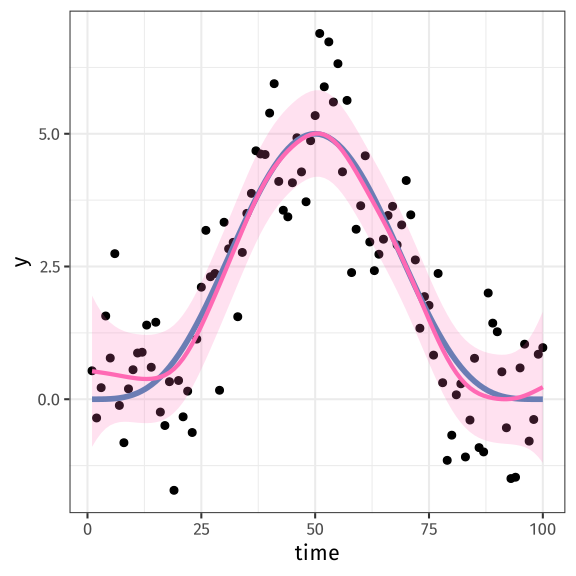<!-- --> ] ] --- # Smoothing autocorrelated data — `bam()` Estimate an AR(1) term in the covariance with `bam()` Provide a value of `\(\rho\)` (`rho`) — use (P)ACF ``` r m <- bam(y ~ s(time, k = 10), data = df, method = "fREML") ``` .row[ .col-6[ ACF ``` r acf(resid(m)) ``` 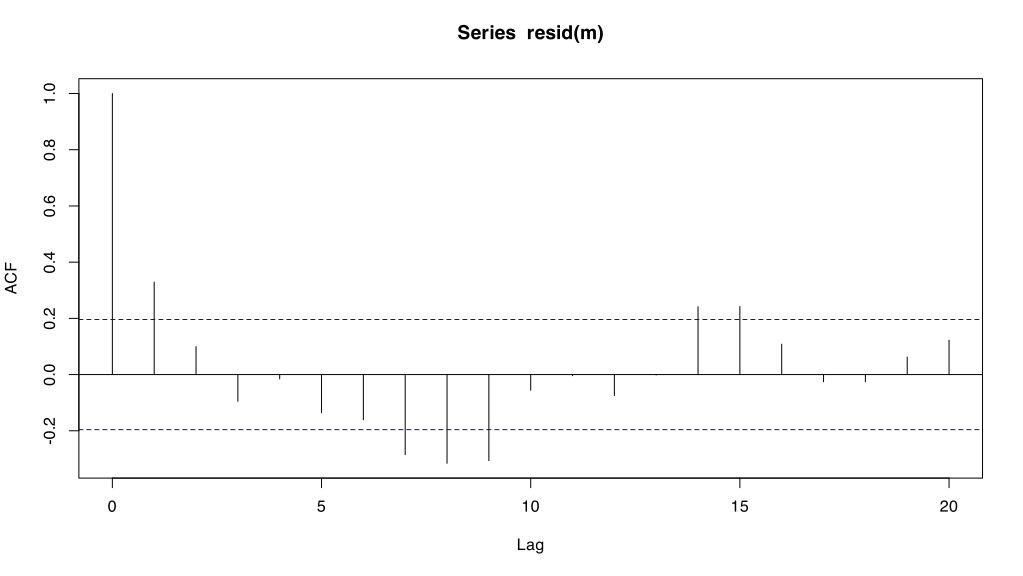<!-- --> ] .col-6[ Partial ACF ``` r pacf(resid(m)) ``` 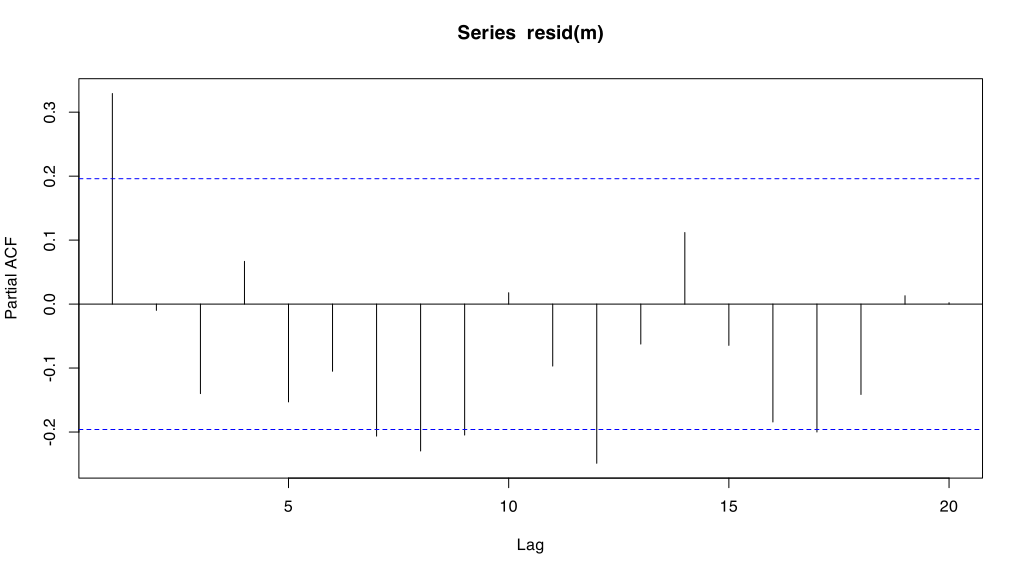<!-- --> ] ] --- # Smoothing autocorrelated data — `bam()` Use estimate of `\(\rho\)`, say `rho = 0.35` ``` r # standard fit b_ar1 <- bam( y ~ s(time, k = 20), data = df, rho = 0.35, #<-- method = "fREML" ) ``` --- # Smoothing autocorrelated data — `bam()` .row[ .col-6[ ``` r # fitted values fv_bar1 <- fitted_values(b_ar1) # plot bar1_plt <- plt + geom_ribbon(data = fv_bar1, aes(ymin = .lower_ci, ymax = .upper_ci, y = NULL), alpha = 0.2, fill = "hotpink") + geom_line(data = fv_bar1, aes(x = time, y = .fitted), col = "hotpink", lwd = 1.5) bar1_plt ``` ] .col-6[ <!-- --> ] ] --- # Compare the fits <img src="index_files/figure-html/autocorrel-compare-fits-plots-1.svg" style="display: block; margin: auto;" /> --- # Compare fits ``` r model_edf(m_ar1, b_ar1) ``` ``` ## # A tibble: 2 × 2 ## .model .edf ## <chr> <dbl> ## 1 m_ar1 7.07 ## 2 b_ar1 7.54 ``` ``` r ## GAMM AR(1) rho nlme::intervals(m_ar1$lme, which = "var-cov")$corStruct ``` ``` ## lower est. upper ## Phi 0.1826355 0.4279269 0.6230681 ## attr(,"label") ## [1] "Correlation structure:" ``` --- # Irregularly spaced data Intervals between observation are irregular? Things get much harder Two main options 1. Fit a continuous time AR(1) (CAR(1)) using `gamm()` — `correlation = corCAR1(form ~ 1)` 2. Fit a 1-D spatial correlation function using `gamm()` — `correlation = corExp(form ~ time)` 3. Or use *brms* or *glmmTMB* 4. Consider *mvgam* — but the trend is a stochastic process, not a smooth --- # But… This can only work if the trend and the autocorrelation process are separately identifiable from the data Or you are willing to impose constraints on one of * the smooth of time (using a low `k`), or * specify the parameters of the autocorrelation process See [Simpson (2018)](https://doi.org/10.3389/fevo.2018.00149) for a brief discussion on this plus examples & the cited references therein --- # Non-normal data? What if you have non-Gaussian data? * `bam()` & AR(1) — GEE-like approach, working correlation matrix * `gamm()` & `correlation` — fits via `MASS::glmmPQL()`, works it **hard** --> fitting problems are common, plus PQL is bad for count data with low means * `brms::brm()` — Bayesian so you have to work harder, no CAR(1), but has spatial correlation functions * `mvgam` — Bayesian so *ditto*, the trend is a stochastic process, not a smooth --- # Or use Neighbourhood CV .row[ .col-9[ New smoothness selection method `method = "NCV"` Not super user friendly Basically, for _each_ observation in the data, we specify 1. the neighbourhood of samples to use for estimating `\(\lambda_j\)`, and 2. the neighbourhood of samples to use for out-of-sample prediction This gets tricky to do easily for complex settings ] .col-3[ <img src="resources/dangerwillrobinson-1.png" width="316" style="display: block; margin: auto;" /> .smaller[ ([Linda Essig](https://creativeinfrastructure.org/2013/01/19/danger-will-robinson/)) ] ] ] --- # NCV We need to define two things: `a`, the indices of observations to drop for each neighbourhood, and `ma`, the end points of each neighbourhood Plus their counterparts for prediction neighbourhoods: `d` and `md` .row[ .col-6[ ``` r nei <- list() start <- pmax(1, (1:100) - 5) end <- pmin(100, (0:99) + 5) nt <- lapply(1:100, \(x) start[x]:end[x]) nei$a <- unlist(nt) nei$ma <- cumsum(lapply(nt, length)) nei$d <- nei$a nei$md <- nei$ma ``` ] .col-6[ ``` r mgcvUtils::vis_nei(nei) ``` <img src="index_files/figure-html/ncv-vis-nei-1.svg" style="display: block; margin: auto;" /> ] ] .smaller[ Code modified from https://calgary.converged.yt/articles/ncv_timeseries.html ] --- # NCV model fitting .row[ .col-6[ ``` r m_ncv <- gam(y ~ s(time, k = 20), data = df, method = "NCV", nei = nei) fv_ncv <- fitted_values(m_ncv) ncv_plt <- plt + geom_ribbon(data = fv_ncv, aes(ymin = .lower_ci, ymax = .upper_ci, y = NULL), alpha = 0.2, fill = "hotpink") + geom_line(data = fv_ncv, aes(x = time, y = .fitted), col = "hotpink", lwd = 1.5) ncv_plt ``` ] .col-6[ <img src="index_files/figure-html/ncv-fitted-plot-1.svg" style="display: block; margin: auto;" /> ] ] --- # Compare <img src="index_files/figure-html/compare-all-methods-1.svg" width="98%" style="display: block; margin: auto;" /> --- # NCV NCV shows huge promise Pain in the butt to setup No R tooling to do the setup for you Read more about it in Simon's preprint [Wood (2024)](https://doi.org/10.48550/arXiv.2404.16490) and Dave Miller's Yes! [You can do that in mgcv](https://calgary.converged.yt/) site Focus with NCV is in estimating the smooths in the presence of local dependence I have no idea what it does to the interpretation of credible intervals or *p* values as the data aren't conditionally independent --- class: inverse center middle subsection # Big additive models --- # Big additive models Fitting GAMs involves turning individual covariates into multiple new variables — basis functions If you have many covariates whose effects are smooth, then model matrix can get big Esp. if you have many data -- Modelling fit can grind to a halt, esp. if you don't have much RAM -- Enter `bam()` --- # `bam()` `bam()` includes algorithms that can fit big models using much less RAM than `gam()` Main restriction currently is that it can't fit distributional GAMs With `bam()` we can do 1. `method = "fREML"`, and 2. `discrete = TRUE` We can also parallelise the fitting over mutliple CPUs or a cluster (only bullet 1.) This also means you can speed up model fitting, often massively so, if you have a multi-core machine and a bit of RAM --- # `bam()` — fast REML The first optimization is `method = "fREML"`; don't use `bam()` without it Uses theory from [Wood *et al* (2015)](https://academic.oup.com/jrsssc/article/64/1/139/7067572) 1. Setup smooths using representative sample of the data 2. Model matrix, `\(\mathbf{X}\)`, is formed in blocks 3. Uses updates to do the QR decomposition block-wise 4. Once blocks are processed, fitting takes place without ever forming full `\(\mathbf{X}\)` Can use a `cluster` built using the *parallel* package, but this uses more RAM --- # `bam()` — discretizing covariates You can fit models to even larger data if you are willing to discretize the covariates Use `discrete = TRUE` For each (marginal) smooth in turn covariates are discretized Discretization involves reducing the precision of the covariate values, thus multiple unique `\(x_i\)` will now have the same `\(x_i\)` This is often OK as in big data many data are not unique This approximation often results in only small differences in estimated effect --- # `bam()` — discretizing covariates With `discrete = TRUE` can no longer use a cluster Instead we can fit in parallel using `nthreads` (but MacOS / Linux) Can also use `samfrac`; for *very* big data, take a random sample of `samfrac`*100% of the data fit model to the sample with sloppy convergence tolerances This gives rough starting values of all the parameters, which can be optimized by then fitting with all of the data --- class: inverse middle center subsection # Marginal effects --- # Regression coefficients <img src="resources/slider-switch-annotated-80.jpg" width="2561" /> Terms in models are like sliders and switches * *sliders* represent continuous variables * *switches* represent categorical variables --- # Regression coefficients ``` r # install.packages("palmerpenguins") library("palmerpenguins") library("tidyr") penguins <- penguins |> drop_na() model_slider <- lm(body_mass_g ~ flipper_length_mm, data = penguins) model_switch <- lm(body_mass_g ~ species, data = penguins) ``` 1. `model_slider` includes the effect of a continuous variable 2. `model_switch` includes the effect of a categorical variable --- # Regression coefficients ``` r library("broom") tidy(model_slider) ``` ``` ## # A tibble: 2 × 5 ## term estimate std.error statistic p.value ## <chr> <dbl> <dbl> <dbl> <dbl> ## 1 (Intercept) -5872. 310. -18.9 1.18e- 54 ## 2 flipper_length_mm 50.2 1.54 32.6 3.13e-105 ``` ``` r tidy(model_switch) ``` ``` ## # A tibble: 3 × 5 ## term estimate std.error statistic p.value ## <chr> <dbl> <dbl> <dbl> <dbl> ## 1 (Intercept) 3706. 38.1 97.2 6.88e-245 ## 2 speciesChinstrap 26.9 67.7 0.398 6.91e- 1 ## 3 speciesGentoo 1386. 56.9 24.4 1.01e- 75 ``` --- # Regression coefficients ``` r tidy(model_slider) ``` ``` ## # A tibble: 2 × 5 ## term estimate std.error statistic p.value ## <chr> <dbl> <dbl> <dbl> <dbl> ## 1 (Intercept) -5872. 310. -18.9 1.18e- 54 ## 2 flipper_length_mm 50.2 1.54 32.6 3.13e-105 ``` `flipper_length_mm` is a continuous variable, so it's a slider As `flipper_length_mm` increases by 1 mm, penguin `body_mass_g` increases by 50.2 grams --- # Regression coefficients ``` r tidy(model_switch) ``` ``` ## # A tibble: 3 × 5 ## term estimate std.error statistic p.value ## <chr> <dbl> <dbl> <dbl> <dbl> ## 1 (Intercept) 3706. 38.1 97.2 6.88e-245 ## 2 speciesChinstrap 26.9 67.7 0.398 6.91e- 1 ## 3 speciesGentoo 1386. 56.9 24.4 1.01e- 75 ``` `Species` is a categorical variable, so it's a switch There are three possible values: `Adelie`, `Chinstrap`, `Gentoo` `Adelie` is the reference category `Chinstrap` penguins are 26.9 grams heavier than `Adelie` `Gentoo` penguins are 1386.3 grams heavier than `Adelie`! --- # What about GLM? ``` r glm_slider <- glm(body_mass_g ~ flipper_length_mm, data = penguins, family = Gamma("log")) glm_switch <- glm(body_mass_g ~ species, data = penguins, family = Gamma("log")) ``` --- # What about GLM? Coefficients are on the *link* scale! — here that's the log scale ``` r tidy(glm_slider) ``` ``` ## # A tibble: 2 × 5 ## term estimate std.error statistic p.value ## <chr> <dbl> <dbl> <dbl> <dbl> ## 1 (Intercept) 6.02 0.0755 79.7 4.07e-218 ## 2 flipper_length_mm 0.0115 0.000375 30.7 9.09e- 99 ``` `flipper_length_mm` is a continuous variable, so it's a slider As `flipper_length_mm` increases by 1 mm, penguin `body_mass_g` is multiplied by 1.012 grams ``` r exp(0.0115) ``` ``` ## [1] 1.011566 ``` --- # Mixers <img src="resources/mixer-board-annotated-80.jpg" width="2561" /> Most models aren't so simple We're often working with multiple variables combining switches and sliders --- # Mixers .small[ ``` r model_mixer <- lm(body_mass_g ~ flipper_length_mm + bill_depth_mm + species + sex, data = penguins) tidy(model_mixer) ``` ``` ## # A tibble: 6 × 5 ## term estimate std.error statistic p.value ## <chr> <dbl> <dbl> <dbl> <dbl> ## 1 (Intercept) -1212. 568. -2.13 3.36e- 2 ## 2 flipper_length_mm 17.5 2.87 6.12 2.66e- 9 ## 3 bill_depth_mm 74.4 19.7 3.77 1.91e- 4 ## 4 speciesChinstrap -78.9 45.5 -1.73 8.38e- 2 ## 5 speciesGentoo 1154. 119. 9.73 8.02e-20 ## 6 sexmale 435. 44.8 9.72 8.79e-20 ``` ] The values in `estimate` are partial effects showing what happens when we change the value of the variable * for continuous variables the change is 1 unit; 1mm * for categorical variables the change is moving *from* the reference category by flicking the switch As these are partial effects (changes), we need to add "holding all other variables constant" --- # Damned terminology A *marginal effect* is a partial derivative from a regression equation * the change in `\(y\)` for a unit change in one of the model terms This also applies to categorical terms as formally (with treatment coding) we're changing 1 unit (0 to 1) when we flick the switch Others use the *conditional effect* or *group constrast* for the effects concerning categorical variables --- # Load marginaleffects ``` r library("marginaleffects") ``` --- # Chick weight example Weights of chicks and effect of diet ``` r data(ChickWeight) cw <- ChickWeight |> as_tibble() |> janitor::clean_names() |> mutate( chick = factor(chick, ordered = FALSE) ) cw ``` ``` ## # A tibble: 578 × 4 ## weight time chick diet ## <dbl> <dbl> <fct> <fct> ## 1 42 0 1 1 ## 2 51 2 1 1 ## 3 59 4 1 1 ## 4 64 6 1 1 ## 5 76 8 1 1 ## 6 93 10 1 1 ## 7 106 12 1 1 ## 8 125 14 1 1 ## 9 149 16 1 1 ## 10 171 18 1 1 ## # ℹ 568 more rows ``` # Chick weight example ``` r ctrl <- gam.control(nthreads = 6) m_cw <- gam( weight ~ s(time) + s(time, diet, bs = "sz") + s(time, chick, bs = "fs", k = 5), data = cw, family = tw(), method = "REML", control = ctrl) ``` # Chick weight example ``` r broom::tidy(m_cw) ``` ``` ## # A tibble: 3 × 5 ## term edf ref.df statistic p.value ## <chr> <dbl> <dbl> <dbl> <dbl> ## 1 s(time) 8.53 8.90 102. 0 ## 2 s(time,diet) 11.5 13.2 3.35 0.0000703 ## 3 s(time,chick) 209. 239 193. 0 ``` What is the effect of `diet`? --- # Averaging We could average the partial derivatives (slopes) for the observed data where for each observation we compare the predicted value with the `diet` switch flicked into different positions .row[ .col-6[ .small[ ``` r cw ``` ``` ## # A tibble: 578 × 4 ## weight time chick diet ## <dbl> <dbl> <fct> <fct> ## 1 42 0 1 1 ## 2 51 2 1 1 ## 3 59 4 1 1 ## 4 64 6 1 1 ## 5 76 8 1 1 ## 6 93 10 1 1 ## 7 106 12 1 1 ## 8 125 14 1 1 ## 9 149 16 1 1 ## 10 171 18 1 1 ## # ℹ 568 more rows ``` ] ] .col-6[ .small[ ``` r m_cw |> slopes(variable = "diet") ``` ``` ## ## Contrast Estimate Std. Error z Pr(>|z|) S 2.5 % 97.5 % ## 2 - 1 0.287 4.77 0.0601 0.952 0.1 -9.066 9.64 ## 2 - 1 2.332 5.07 0.4601 0.645 0.6 -7.604 12.27 ## 2 - 1 4.894 5.42 0.9035 0.366 1.4 -5.723 15.51 ## 2 - 1 8.512 6.11 1.3927 0.164 2.6 -3.467 20.49 ## 2 - 1 12.695 6.90 1.8386 0.066 3.9 -0.838 26.23 ## --- 1724 rows omitted. See ?print.marginaleffects --- ## 4 - 1 53.002 9.88 5.3649 <0.001 23.6 33.639 72.36 ## 4 - 1 62.516 12.15 5.1452 <0.001 21.8 38.702 86.33 ## 4 - 1 76.009 15.10 5.0350 <0.001 21.0 46.422 105.60 ## 4 - 1 87.282 18.18 4.8004 <0.001 19.3 51.646 122.92 ## 4 - 1 92.180 20.03 4.6020 <0.001 17.9 52.921 131.44 ## Term: diet ## Type: response ``` ] ] ] --- # Averaging: step 1 Create the data we need; three copies of the observed data, with `diet` set to 1, 2, 3 respectively .row[ .col-6[ .small[ ``` r (df_diet1 <- datagrid(model = m_cw, diet = "1", grid_type = "counterfactual")) ``` ``` ## rowid rowidcf chick time weight diet ## 1 1 1 1 0 42 1 ## 2 2 2 1 2 51 1 ## 3 3 3 1 4 59 1 ## 4 4 4 1 6 64 1 ## 5 5 5 1 8 76 1 ## 6 6 6 1 10 93 1 ## 7 7 7 1 12 106 1 ## 8 8 8 1 14 125 1 ## 9 9 9 1 16 149 1 ## 10 10 10 1 18 171 1 ## 11 11 11 1 20 199 1 ## 12 12 12 1 21 205 1 ## 13 13 13 2 0 40 1 ## 14 14 14 2 2 49 1 ## 15 15 15 2 4 58 1 ## 16 16 16 2 6 72 1 ## 17 17 17 2 8 84 1 ## 18 18 18 2 10 103 1 ## 19 19 19 2 12 122 1 ## 20 20 20 2 14 138 1 ## 21 21 21 2 16 162 1 ## 22 22 22 2 18 187 1 ## 23 23 23 2 20 209 1 ## 24 24 24 2 21 215 1 ## 25 25 25 3 0 43 1 ## 26 26 26 3 2 39 1 ## 27 27 27 3 4 55 1 ## 28 28 28 3 6 67 1 ## 29 29 29 3 8 84 1 ## 30 30 30 3 10 99 1 ## 31 31 31 3 12 115 1 ## 32 32 32 3 14 138 1 ## 33 33 33 3 16 163 1 ## 34 34 34 3 18 187 1 ## 35 35 35 3 20 198 1 ## 36 36 36 3 21 202 1 ## 37 37 37 4 0 42 1 ## 38 38 38 4 2 49 1 ## 39 39 39 4 4 56 1 ## 40 40 40 4 6 67 1 ## 41 41 41 4 8 74 1 ## 42 42 42 4 10 87 1 ## 43 43 43 4 12 102 1 ## 44 44 44 4 14 108 1 ## 45 45 45 4 16 136 1 ## 46 46 46 4 18 154 1 ## 47 47 47 4 20 160 1 ## 48 48 48 4 21 157 1 ## 49 49 49 5 0 41 1 ## 50 50 50 5 2 42 1 ## 51 51 51 5 4 48 1 ## 52 52 52 5 6 60 1 ## 53 53 53 5 8 79 1 ## 54 54 54 5 10 106 1 ## 55 55 55 5 12 141 1 ## 56 56 56 5 14 164 1 ## 57 57 57 5 16 197 1 ## 58 58 58 5 18 199 1 ## 59 59 59 5 20 220 1 ## 60 60 60 5 21 223 1 ## 61 61 61 6 0 41 1 ## 62 62 62 6 2 49 1 ## 63 63 63 6 4 59 1 ## 64 64 64 6 6 74 1 ## 65 65 65 6 8 97 1 ## 66 66 66 6 10 124 1 ## 67 67 67 6 12 141 1 ## 68 68 68 6 14 148 1 ## 69 69 69 6 16 155 1 ## 70 70 70 6 18 160 1 ## 71 71 71 6 20 160 1 ## 72 72 72 6 21 157 1 ## 73 73 73 7 0 41 1 ## 74 74 74 7 2 49 1 ## 75 75 75 7 4 57 1 ## 76 76 76 7 6 71 1 ## 77 77 77 7 8 89 1 ## 78 78 78 7 10 112 1 ## 79 79 79 7 12 146 1 ## 80 80 80 7 14 174 1 ## 81 81 81 7 16 218 1 ## 82 82 82 7 18 250 1 ## 83 83 83 7 20 288 1 ## 84 84 84 7 21 305 1 ## 85 85 85 8 0 42 1 ## 86 86 86 8 2 50 1 ## 87 87 87 8 4 61 1 ## 88 88 88 8 6 71 1 ## 89 89 89 8 8 84 1 ## 90 90 90 8 10 93 1 ## 91 91 91 8 12 110 1 ## 92 92 92 8 14 116 1 ## 93 93 93 8 16 126 1 ## 94 94 94 8 18 134 1 ## 95 95 95 8 20 125 1 ## 96 96 96 9 0 42 1 ## 97 97 97 9 2 51 1 ## 98 98 98 9 4 59 1 ## 99 99 99 9 6 68 1 ## 100 100 100 9 8 85 1 ## 101 101 101 9 10 96 1 ## 102 102 102 9 12 90 1 ## 103 103 103 9 14 92 1 ## 104 104 104 9 16 93 1 ## 105 105 105 9 18 100 1 ## 106 106 106 9 20 100 1 ## 107 107 107 9 21 98 1 ## 108 108 108 10 0 41 1 ## 109 109 109 10 2 44 1 ## 110 110 110 10 4 52 1 ## 111 111 111 10 6 63 1 ## 112 112 112 10 8 74 1 ## 113 113 113 10 10 81 1 ## 114 114 114 10 12 89 1 ## 115 115 115 10 14 96 1 ## 116 116 116 10 16 101 1 ## 117 117 117 10 18 112 1 ## 118 118 118 10 20 120 1 ## 119 119 119 10 21 124 1 ## 120 120 120 11 0 43 1 ## 121 121 121 11 2 51 1 ## 122 122 122 11 4 63 1 ## 123 123 123 11 6 84 1 ## 124 124 124 11 8 112 1 ## 125 125 125 11 10 139 1 ## 126 126 126 11 12 168 1 ## 127 127 127 11 14 177 1 ## 128 128 128 11 16 182 1 ## 129 129 129 11 18 184 1 ## 130 130 130 11 20 181 1 ## 131 131 131 11 21 175 1 ## 132 132 132 12 0 41 1 ## 133 133 133 12 2 49 1 ## 134 134 134 12 4 56 1 ## 135 135 135 12 6 62 1 ## 136 136 136 12 8 72 1 ## 137 137 137 12 10 88 1 ## 138 138 138 12 12 119 1 ## 139 139 139 12 14 135 1 ## 140 140 140 12 16 162 1 ## 141 141 141 12 18 185 1 ## 142 142 142 12 20 195 1 ## 143 143 143 12 21 205 1 ## 144 144 144 13 0 41 1 ## 145 145 145 13 2 48 1 ## 146 146 146 13 4 53 1 ## 147 147 147 13 6 60 1 ## 148 148 148 13 8 65 1 ## 149 149 149 13 10 67 1 ## 150 150 150 13 12 71 1 ## 151 151 151 13 14 70 1 ## 152 152 152 13 16 71 1 ## 153 153 153 13 18 81 1 ## 154 154 154 13 20 91 1 ## 155 155 155 13 21 96 1 ## 156 156 156 14 0 41 1 ## 157 157 157 14 2 49 1 ## 158 158 158 14 4 62 1 ## 159 159 159 14 6 79 1 ## 160 160 160 14 8 101 1 ## 161 161 161 14 10 128 1 ## 162 162 162 14 12 164 1 ## 163 163 163 14 14 192 1 ## 164 164 164 14 16 227 1 ## 165 165 165 14 18 248 1 ## 166 166 166 14 20 259 1 ## 167 167 167 14 21 266 1 ## 168 168 168 15 0 41 1 ## 169 169 169 15 2 49 1 ## 170 170 170 15 4 56 1 ## 171 171 171 15 6 64 1 ## 172 172 172 15 8 68 1 ## 173 173 173 15 10 68 1 ## 174 174 174 15 12 67 1 ## 175 175 175 15 14 68 1 ## 176 176 176 16 0 41 1 ## 177 177 177 16 2 45 1 ## 178 178 178 16 4 49 1 ## 179 179 179 16 6 51 1 ## 180 180 180 16 8 57 1 ## 181 181 181 16 10 51 1 ## 182 182 182 16 12 54 1 ## 183 183 183 17 0 42 1 ## 184 184 184 17 2 51 1 ## 185 185 185 17 4 61 1 ## 186 186 186 17 6 72 1 ## 187 187 187 17 8 83 1 ## 188 188 188 17 10 89 1 ## 189 189 189 17 12 98 1 ## 190 190 190 17 14 103 1 ## 191 191 191 17 16 113 1 ## 192 192 192 17 18 123 1 ## 193 193 193 17 20 133 1 ## 194 194 194 17 21 142 1 ## 195 195 195 18 0 39 1 ## 196 196 196 18 2 35 1 ## 197 197 197 19 0 43 1 ## 198 198 198 19 2 48 1 ## 199 199 199 19 4 55 1 ## 200 200 200 19 6 62 1 ## 201 201 201 19 8 65 1 ## 202 202 202 19 10 71 1 ## 203 203 203 19 12 82 1 ## 204 204 204 19 14 88 1 ## 205 205 205 19 16 106 1 ## 206 206 206 19 18 120 1 ## 207 207 207 19 20 144 1 ## 208 208 208 19 21 157 1 ## 209 209 209 20 0 41 1 ## 210 210 210 20 2 47 1 ## 211 211 211 20 4 54 1 ## 212 212 212 20 6 58 1 ## 213 213 213 20 8 65 1 ## 214 214 214 20 10 73 1 ## 215 215 215 20 12 77 1 ## 216 216 216 20 14 89 1 ## 217 217 217 20 16 98 1 ## 218 218 218 20 18 107 1 ## 219 219 219 20 20 115 1 ## 220 220 220 20 21 117 1 ## 221 221 221 21 0 40 1 ## 222 222 222 21 2 50 1 ## 223 223 223 21 4 62 1 ## 224 224 224 21 6 86 1 ## 225 225 225 21 8 125 1 ## 226 226 226 21 10 163 1 ## 227 227 227 21 12 217 1 ## 228 228 228 21 14 240 1 ## 229 229 229 21 16 275 1 ## 230 230 230 21 18 307 1 ## 231 231 231 21 20 318 1 ## 232 232 232 21 21 331 1 ## 233 233 233 22 0 41 1 ## 234 234 234 22 2 55 1 ## 235 235 235 22 4 64 1 ## 236 236 236 22 6 77 1 ## 237 237 237 22 8 90 1 ## 238 238 238 22 10 95 1 ## 239 239 239 22 12 108 1 ## 240 240 240 22 14 111 1 ## 241 241 241 22 16 131 1 ## 242 242 242 22 18 148 1 ## 243 243 243 22 20 164 1 ## 244 244 244 22 21 167 1 ## 245 245 245 23 0 43 1 ## 246 246 246 23 2 52 1 ## 247 247 247 23 4 61 1 ## 248 248 248 23 6 73 1 ## 249 249 249 23 8 90 1 ## 250 250 250 23 10 103 1 ## 251 251 251 23 12 127 1 ## 252 252 252 23 14 135 1 ## 253 253 253 23 16 145 1 ## 254 254 254 23 18 163 1 ## 255 255 255 23 20 170 1 ## 256 256 256 23 21 175 1 ## 257 257 257 24 0 42 1 ## 258 258 258 24 2 52 1 ## 259 259 259 24 4 58 1 ## 260 260 260 24 6 74 1 ## 261 261 261 24 8 66 1 ## 262 262 262 24 10 68 1 ## 263 263 263 24 12 70 1 ## 264 264 264 24 14 71 1 ## 265 265 265 24 16 72 1 ## 266 266 266 24 18 72 1 ## 267 267 267 24 20 76 1 ## 268 268 268 24 21 74 1 ## 269 269 269 25 0 40 1 ## 270 270 270 25 2 49 1 ## 271 271 271 25 4 62 1 ## 272 272 272 25 6 78 1 ## 273 273 273 25 8 102 1 ## 274 274 274 25 10 124 1 ## 275 275 275 25 12 146 1 ## 276 276 276 25 14 164 1 ## 277 277 277 25 16 197 1 ## 278 278 278 25 18 231 1 ## 279 279 279 25 20 259 1 ## 280 280 280 25 21 265 1 ## 281 281 281 26 0 42 1 ## 282 282 282 26 2 48 1 ## 283 283 283 26 4 57 1 ## 284 284 284 26 6 74 1 ## 285 285 285 26 8 93 1 ## 286 286 286 26 10 114 1 ## 287 287 287 26 12 136 1 ## 288 288 288 26 14 147 1 ## 289 289 289 26 16 169 1 ## 290 290 290 26 18 205 1 ## 291 291 291 26 20 236 1 ## 292 292 292 26 21 251 1 ## 293 293 293 27 0 39 1 ## 294 294 294 27 2 46 1 ## 295 295 295 27 4 58 1 ## 296 296 296 27 6 73 1 ## 297 297 297 27 8 87 1 ## 298 298 298 27 10 100 1 ## 299 299 299 27 12 115 1 ## 300 300 300 27 14 123 1 ## 301 301 301 27 16 144 1 ## 302 302 302 27 18 163 1 ## 303 303 303 27 20 185 1 ## 304 304 304 27 21 192 1 ## 305 305 305 28 0 39 1 ## 306 306 306 28 2 46 1 ## 307 307 307 28 4 58 1 ## 308 308 308 28 6 73 1 ## 309 309 309 28 8 92 1 ## 310 310 310 28 10 114 1 ## 311 311 311 28 12 145 1 ## 312 312 312 28 14 156 1 ## 313 313 313 28 16 184 1 ## 314 314 314 28 18 207 1 ## 315 315 315 28 20 212 1 ## 316 316 316 28 21 233 1 ## 317 317 317 29 0 39 1 ## 318 318 318 29 2 48 1 ## 319 319 319 29 4 59 1 ## 320 320 320 29 6 74 1 ## 321 321 321 29 8 87 1 ## 322 322 322 29 10 106 1 ## 323 323 323 29 12 134 1 ## 324 324 324 29 14 150 1 ## 325 325 325 29 16 187 1 ## 326 326 326 29 18 230 1 ## 327 327 327 29 20 279 1 ## 328 328 328 29 21 309 1 ## 329 329 329 30 0 42 1 ## 330 330 330 30 2 48 1 ## 331 331 331 30 4 59 1 ## 332 332 332 30 6 72 1 ## 333 333 333 30 8 85 1 ## 334 334 334 30 10 98 1 ## 335 335 335 30 12 115 1 ## 336 336 336 30 14 122 1 ## 337 337 337 30 16 143 1 ## 338 338 338 30 18 151 1 ## 339 339 339 30 20 157 1 ## 340 340 340 30 21 150 1 ## 341 341 341 31 0 42 1 ## 342 342 342 31 2 53 1 ## 343 343 343 31 4 62 1 ## 344 344 344 31 6 73 1 ## 345 345 345 31 8 85 1 ## 346 346 346 31 10 102 1 ## 347 347 347 31 12 123 1 ## 348 348 348 31 14 138 1 ## 349 349 349 31 16 170 1 ## 350 350 350 31 18 204 1 ## 351 351 351 31 20 235 1 ## 352 352 352 31 21 256 1 ## 353 353 353 32 0 41 1 ## 354 354 354 32 2 49 1 ## 355 355 355 32 4 65 1 ## 356 356 356 32 6 82 1 ## 357 357 357 32 8 107 1 ## 358 358 358 32 10 129 1 ## 359 359 359 32 12 159 1 ## 360 360 360 32 14 179 1 ## 361 361 361 32 16 221 1 ## 362 362 362 32 18 263 1 ## 363 363 363 32 20 291 1 ## 364 364 364 32 21 305 1 ## 365 365 365 33 0 39 1 ## 366 366 366 33 2 50 1 ## 367 367 367 33 4 63 1 ## 368 368 368 33 6 77 1 ## 369 369 369 33 8 96 1 ## 370 370 370 33 10 111 1 ## 371 371 371 33 12 137 1 ## 372 372 372 33 14 144 1 ## 373 373 373 33 16 151 1 ## 374 374 374 33 18 146 1 ## 375 375 375 33 20 156 1 ## 376 376 376 33 21 147 1 ## 377 377 377 34 0 41 1 ## 378 378 378 34 2 49 1 ## 379 379 379 34 4 63 1 ## 380 380 380 34 6 85 1 ## 381 381 381 34 8 107 1 ## 382 382 382 34 10 134 1 ## 383 383 383 34 12 164 1 ## 384 384 384 34 14 186 1 ## 385 385 385 34 16 235 1 ## 386 386 386 34 18 294 1 ## 387 387 387 34 20 327 1 ## 388 388 388 34 21 341 1 ## 389 389 389 35 0 41 1 ## 390 390 390 35 2 53 1 ## 391 391 391 35 4 64 1 ## 392 392 392 35 6 87 1 ## 393 393 393 35 8 123 1 ## 394 394 394 35 10 158 1 ## 395 395 395 35 12 201 1 ## 396 396 396 35 14 238 1 ## 397 397 397 35 16 287 1 ## 398 398 398 35 18 332 1 ## 399 399 399 35 20 361 1 ## 400 400 400 35 21 373 1 ## 401 401 401 36 0 39 1 ## 402 402 402 36 2 48 1 ## 403 403 403 36 4 61 1 ## 404 404 404 36 6 76 1 ## 405 405 405 36 8 98 1 ## 406 406 406 36 10 116 1 ## 407 407 407 36 12 145 1 ## 408 408 408 36 14 166 1 ## 409 409 409 36 16 198 1 ## 410 410 410 36 18 227 1 ## 411 411 411 36 20 225 1 ## 412 412 412 36 21 220 1 ## 413 413 413 37 0 41 1 ## 414 414 414 37 2 48 1 ## 415 415 415 37 4 56 1 ## 416 416 416 37 6 68 1 ## 417 417 417 37 8 80 1 ## 418 418 418 37 10 83 1 ## 419 419 419 37 12 103 1 ## 420 420 420 37 14 112 1 ## 421 421 421 37 16 135 1 ## 422 422 422 37 18 157 1 ## 423 423 423 37 20 169 1 ## 424 424 424 37 21 178 1 ## 425 425 425 38 0 41 1 ## 426 426 426 38 2 49 1 ## 427 427 427 38 4 61 1 ## 428 428 428 38 6 74 1 ## 429 429 429 38 8 98 1 ## 430 430 430 38 10 109 1 ## 431 431 431 38 12 128 1 ## 432 432 432 38 14 154 1 ## 433 433 433 38 16 192 1 ## 434 434 434 38 18 232 1 ## 435 435 435 38 20 280 1 ## 436 436 436 38 21 290 1 ## 437 437 437 39 0 42 1 ## 438 438 438 39 2 50 1 ## 439 439 439 39 4 61 1 ## 440 440 440 39 6 78 1 ## 441 441 441 39 8 89 1 ## 442 442 442 39 10 109 1 ## 443 443 443 39 12 130 1 ## 444 444 444 39 14 146 1 ## 445 445 445 39 16 170 1 ## 446 446 446 39 18 214 1 ## 447 447 447 39 20 250 1 ## 448 448 448 39 21 272 1 ## 449 449 449 40 0 41 1 ## 450 450 450 40 2 55 1 ## 451 451 451 40 4 66 1 ## 452 452 452 40 6 79 1 ## 453 453 453 40 8 101 1 ## 454 454 454 40 10 120 1 ## 455 455 455 40 12 154 1 ## 456 456 456 40 14 182 1 ## 457 457 457 40 16 215 1 ## 458 458 458 40 18 262 1 ## 459 459 459 40 20 295 1 ## 460 460 460 40 21 321 1 ## 461 461 461 41 0 42 1 ## 462 462 462 41 2 51 1 ## 463 463 463 41 4 66 1 ## 464 464 464 41 6 85 1 ## 465 465 465 41 8 103 1 ## 466 466 466 41 10 124 1 ## 467 467 467 41 12 155 1 ## 468 468 468 41 14 153 1 ## 469 469 469 41 16 175 1 ## 470 470 470 41 18 184 1 ## 471 471 471 41 20 199 1 ## 472 472 472 41 21 204 1 ## 473 473 473 42 0 42 1 ## 474 474 474 42 2 49 1 ## 475 475 475 42 4 63 1 ## 476 476 476 42 6 84 1 ## 477 477 477 42 8 103 1 ## 478 478 478 42 10 126 1 ## 479 479 479 42 12 160 1 ## 480 480 480 42 14 174 1 ## 481 481 481 42 16 204 1 ## 482 482 482 42 18 234 1 ## 483 483 483 42 20 269 1 ## 484 484 484 42 21 281 1 ## 485 485 485 43 0 42 1 ## 486 486 486 43 2 55 1 ## 487 487 487 43 4 69 1 ## 488 488 488 43 6 96 1 ## 489 489 489 43 8 131 1 ## 490 490 490 43 10 157 1 ## 491 491 491 43 12 184 1 ## 492 492 492 43 14 188 1 ## 493 493 493 43 16 197 1 ## 494 494 494 43 18 198 1 ## 495 495 495 43 20 199 1 ## 496 496 496 43 21 200 1 ## 497 497 497 44 0 42 1 ## 498 498 498 44 2 51 1 ## 499 499 499 44 4 65 1 ## 500 500 500 44 6 86 1 ## 501 501 501 44 8 103 1 ## 502 502 502 44 10 118 1 ## 503 503 503 44 12 127 1 ## 504 504 504 44 14 138 1 ## 505 505 505 44 16 145 1 ## 506 506 506 44 18 146 1 ## 507 507 507 45 0 41 1 ## 508 508 508 45 2 50 1 ## 509 509 509 45 4 61 1 ## 510 510 510 45 6 78 1 ## 511 511 511 45 8 98 1 ## 512 512 512 45 10 117 1 ## 513 513 513 45 12 135 1 ## 514 514 514 45 14 141 1 ## 515 515 515 45 16 147 1 ## 516 516 516 45 18 174 1 ## 517 517 517 45 20 197 1 ## 518 518 518 45 21 196 1 ## 519 519 519 46 0 40 1 ## 520 520 520 46 2 52 1 ## 521 521 521 46 4 62 1 ## 522 522 522 46 6 82 1 ## 523 523 523 46 8 101 1 ## 524 524 524 46 10 120 1 ## 525 525 525 46 12 144 1 ## 526 526 526 46 14 156 1 ## 527 527 527 46 16 173 1 ## 528 528 528 46 18 210 1 ## 529 529 529 46 20 231 1 ## 530 530 530 46 21 238 1 ## 531 531 531 47 0 41 1 ## 532 532 532 47 2 53 1 ## 533 533 533 47 4 66 1 ## 534 534 534 47 6 79 1 ## 535 535 535 47 8 100 1 ## 536 536 536 47 10 123 1 ## 537 537 537 47 12 148 1 ## 538 538 538 47 14 157 1 ## 539 539 539 47 16 168 1 ## 540 540 540 47 18 185 1 ## 541 541 541 47 20 210 1 ## 542 542 542 47 21 205 1 ## 543 543 543 48 0 39 1 ## 544 544 544 48 2 50 1 ## 545 545 545 48 4 62 1 ## 546 546 546 48 6 80 1 ## 547 547 547 48 8 104 1 ## 548 548 548 48 10 125 1 ## 549 549 549 48 12 154 1 ## 550 550 550 48 14 170 1 ## 551 551 551 48 16 222 1 ## 552 552 552 48 18 261 1 ## 553 553 553 48 20 303 1 ## 554 554 554 48 21 322 1 ## 555 555 555 49 0 40 1 ## 556 556 556 49 2 53 1 ## 557 557 557 49 4 64 1 ## 558 558 558 49 6 85 1 ## 559 559 559 49 8 108 1 ## 560 560 560 49 10 128 1 ## 561 561 561 49 12 152 1 ## 562 562 562 49 14 166 1 ## 563 563 563 49 16 184 1 ## 564 564 564 49 18 203 1 ## 565 565 565 49 20 233 1 ## 566 566 566 49 21 237 1 ## 567 567 567 50 0 41 1 ## 568 568 568 50 2 54 1 ## 569 569 569 50 4 67 1 ## 570 570 570 50 6 84 1 ## 571 571 571 50 8 105 1 ## 572 572 572 50 10 122 1 ## 573 573 573 50 12 155 1 ## 574 574 574 50 14 175 1 ## 575 575 575 50 16 205 1 ## 576 576 576 50 18 234 1 ## 577 577 577 50 20 264 1 ## 578 578 578 50 21 264 1 ``` ] ] .col-6[ .small[ ``` r (df_diet2 <- datagrid(model = m_cw, diet = "2", grid_type = "counterfactual")) ``` ``` ## rowid rowidcf chick time weight diet ## 1 1 1 1 0 42 2 ## 2 2 2 1 2 51 2 ## 3 3 3 1 4 59 2 ## 4 4 4 1 6 64 2 ## 5 5 5 1 8 76 2 ## 6 6 6 1 10 93 2 ## 7 7 7 1 12 106 2 ## 8 8 8 1 14 125 2 ## 9 9 9 1 16 149 2 ## 10 10 10 1 18 171 2 ## 11 11 11 1 20 199 2 ## 12 12 12 1 21 205 2 ## 13 13 13 2 0 40 2 ## 14 14 14 2 2 49 2 ## 15 15 15 2 4 58 2 ## 16 16 16 2 6 72 2 ## 17 17 17 2 8 84 2 ## 18 18 18 2 10 103 2 ## 19 19 19 2 12 122 2 ## 20 20 20 2 14 138 2 ## 21 21 21 2 16 162 2 ## 22 22 22 2 18 187 2 ## 23 23 23 2 20 209 2 ## 24 24 24 2 21 215 2 ## 25 25 25 3 0 43 2 ## 26 26 26 3 2 39 2 ## 27 27 27 3 4 55 2 ## 28 28 28 3 6 67 2 ## 29 29 29 3 8 84 2 ## 30 30 30 3 10 99 2 ## 31 31 31 3 12 115 2 ## 32 32 32 3 14 138 2 ## 33 33 33 3 16 163 2 ## 34 34 34 3 18 187 2 ## 35 35 35 3 20 198 2 ## 36 36 36 3 21 202 2 ## 37 37 37 4 0 42 2 ## 38 38 38 4 2 49 2 ## 39 39 39 4 4 56 2 ## 40 40 40 4 6 67 2 ## 41 41 41 4 8 74 2 ## 42 42 42 4 10 87 2 ## 43 43 43 4 12 102 2 ## 44 44 44 4 14 108 2 ## 45 45 45 4 16 136 2 ## 46 46 46 4 18 154 2 ## 47 47 47 4 20 160 2 ## 48 48 48 4 21 157 2 ## 49 49 49 5 0 41 2 ## 50 50 50 5 2 42 2 ## 51 51 51 5 4 48 2 ## 52 52 52 5 6 60 2 ## 53 53 53 5 8 79 2 ## 54 54 54 5 10 106 2 ## 55 55 55 5 12 141 2 ## 56 56 56 5 14 164 2 ## 57 57 57 5 16 197 2 ## 58 58 58 5 18 199 2 ## 59 59 59 5 20 220 2 ## 60 60 60 5 21 223 2 ## 61 61 61 6 0 41 2 ## 62 62 62 6 2 49 2 ## 63 63 63 6 4 59 2 ## 64 64 64 6 6 74 2 ## 65 65 65 6 8 97 2 ## 66 66 66 6 10 124 2 ## 67 67 67 6 12 141 2 ## 68 68 68 6 14 148 2 ## 69 69 69 6 16 155 2 ## 70 70 70 6 18 160 2 ## 71 71 71 6 20 160 2 ## 72 72 72 6 21 157 2 ## 73 73 73 7 0 41 2 ## 74 74 74 7 2 49 2 ## 75 75 75 7 4 57 2 ## 76 76 76 7 6 71 2 ## 77 77 77 7 8 89 2 ## 78 78 78 7 10 112 2 ## 79 79 79 7 12 146 2 ## 80 80 80 7 14 174 2 ## 81 81 81 7 16 218 2 ## 82 82 82 7 18 250 2 ## 83 83 83 7 20 288 2 ## 84 84 84 7 21 305 2 ## 85 85 85 8 0 42 2 ## 86 86 86 8 2 50 2 ## 87 87 87 8 4 61 2 ## 88 88 88 8 6 71 2 ## 89 89 89 8 8 84 2 ## 90 90 90 8 10 93 2 ## 91 91 91 8 12 110 2 ## 92 92 92 8 14 116 2 ## 93 93 93 8 16 126 2 ## 94 94 94 8 18 134 2 ## 95 95 95 8 20 125 2 ## 96 96 96 9 0 42 2 ## 97 97 97 9 2 51 2 ## 98 98 98 9 4 59 2 ## 99 99 99 9 6 68 2 ## 100 100 100 9 8 85 2 ## 101 101 101 9 10 96 2 ## 102 102 102 9 12 90 2 ## 103 103 103 9 14 92 2 ## 104 104 104 9 16 93 2 ## 105 105 105 9 18 100 2 ## 106 106 106 9 20 100 2 ## 107 107 107 9 21 98 2 ## 108 108 108 10 0 41 2 ## 109 109 109 10 2 44 2 ## 110 110 110 10 4 52 2 ## 111 111 111 10 6 63 2 ## 112 112 112 10 8 74 2 ## 113 113 113 10 10 81 2 ## 114 114 114 10 12 89 2 ## 115 115 115 10 14 96 2 ## 116 116 116 10 16 101 2 ## 117 117 117 10 18 112 2 ## 118 118 118 10 20 120 2 ## 119 119 119 10 21 124 2 ## 120 120 120 11 0 43 2 ## 121 121 121 11 2 51 2 ## 122 122 122 11 4 63 2 ## 123 123 123 11 6 84 2 ## 124 124 124 11 8 112 2 ## 125 125 125 11 10 139 2 ## 126 126 126 11 12 168 2 ## 127 127 127 11 14 177 2 ## 128 128 128 11 16 182 2 ## 129 129 129 11 18 184 2 ## 130 130 130 11 20 181 2 ## 131 131 131 11 21 175 2 ## 132 132 132 12 0 41 2 ## 133 133 133 12 2 49 2 ## 134 134 134 12 4 56 2 ## 135 135 135 12 6 62 2 ## 136 136 136 12 8 72 2 ## 137 137 137 12 10 88 2 ## 138 138 138 12 12 119 2 ## 139 139 139 12 14 135 2 ## 140 140 140 12 16 162 2 ## 141 141 141 12 18 185 2 ## 142 142 142 12 20 195 2 ## 143 143 143 12 21 205 2 ## 144 144 144 13 0 41 2 ## 145 145 145 13 2 48 2 ## 146 146 146 13 4 53 2 ## 147 147 147 13 6 60 2 ## 148 148 148 13 8 65 2 ## 149 149 149 13 10 67 2 ## 150 150 150 13 12 71 2 ## 151 151 151 13 14 70 2 ## 152 152 152 13 16 71 2 ## 153 153 153 13 18 81 2 ## 154 154 154 13 20 91 2 ## 155 155 155 13 21 96 2 ## 156 156 156 14 0 41 2 ## 157 157 157 14 2 49 2 ## 158 158 158 14 4 62 2 ## 159 159 159 14 6 79 2 ## 160 160 160 14 8 101 2 ## 161 161 161 14 10 128 2 ## 162 162 162 14 12 164 2 ## 163 163 163 14 14 192 2 ## 164 164 164 14 16 227 2 ## 165 165 165 14 18 248 2 ## 166 166 166 14 20 259 2 ## 167 167 167 14 21 266 2 ## 168 168 168 15 0 41 2 ## 169 169 169 15 2 49 2 ## 170 170 170 15 4 56 2 ## 171 171 171 15 6 64 2 ## 172 172 172 15 8 68 2 ## 173 173 173 15 10 68 2 ## 174 174 174 15 12 67 2 ## 175 175 175 15 14 68 2 ## 176 176 176 16 0 41 2 ## 177 177 177 16 2 45 2 ## 178 178 178 16 4 49 2 ## 179 179 179 16 6 51 2 ## 180 180 180 16 8 57 2 ## 181 181 181 16 10 51 2 ## 182 182 182 16 12 54 2 ## 183 183 183 17 0 42 2 ## 184 184 184 17 2 51 2 ## 185 185 185 17 4 61 2 ## 186 186 186 17 6 72 2 ## 187 187 187 17 8 83 2 ## 188 188 188 17 10 89 2 ## 189 189 189 17 12 98 2 ## 190 190 190 17 14 103 2 ## 191 191 191 17 16 113 2 ## 192 192 192 17 18 123 2 ## 193 193 193 17 20 133 2 ## 194 194 194 17 21 142 2 ## 195 195 195 18 0 39 2 ## 196 196 196 18 2 35 2 ## 197 197 197 19 0 43 2 ## 198 198 198 19 2 48 2 ## 199 199 199 19 4 55 2 ## 200 200 200 19 6 62 2 ## 201 201 201 19 8 65 2 ## 202 202 202 19 10 71 2 ## 203 203 203 19 12 82 2 ## 204 204 204 19 14 88 2 ## 205 205 205 19 16 106 2 ## 206 206 206 19 18 120 2 ## 207 207 207 19 20 144 2 ## 208 208 208 19 21 157 2 ## 209 209 209 20 0 41 2 ## 210 210 210 20 2 47 2 ## 211 211 211 20 4 54 2 ## 212 212 212 20 6 58 2 ## 213 213 213 20 8 65 2 ## 214 214 214 20 10 73 2 ## 215 215 215 20 12 77 2 ## 216 216 216 20 14 89 2 ## 217 217 217 20 16 98 2 ## 218 218 218 20 18 107 2 ## 219 219 219 20 20 115 2 ## 220 220 220 20 21 117 2 ## 221 221 221 21 0 40 2 ## 222 222 222 21 2 50 2 ## 223 223 223 21 4 62 2 ## 224 224 224 21 6 86 2 ## 225 225 225 21 8 125 2 ## 226 226 226 21 10 163 2 ## 227 227 227 21 12 217 2 ## 228 228 228 21 14 240 2 ## 229 229 229 21 16 275 2 ## 230 230 230 21 18 307 2 ## 231 231 231 21 20 318 2 ## 232 232 232 21 21 331 2 ## 233 233 233 22 0 41 2 ## 234 234 234 22 2 55 2 ## 235 235 235 22 4 64 2 ## 236 236 236 22 6 77 2 ## 237 237 237 22 8 90 2 ## 238 238 238 22 10 95 2 ## 239 239 239 22 12 108 2 ## 240 240 240 22 14 111 2 ## 241 241 241 22 16 131 2 ## 242 242 242 22 18 148 2 ## 243 243 243 22 20 164 2 ## 244 244 244 22 21 167 2 ## 245 245 245 23 0 43 2 ## 246 246 246 23 2 52 2 ## 247 247 247 23 4 61 2 ## 248 248 248 23 6 73 2 ## 249 249 249 23 8 90 2 ## 250 250 250 23 10 103 2 ## 251 251 251 23 12 127 2 ## 252 252 252 23 14 135 2 ## 253 253 253 23 16 145 2 ## 254 254 254 23 18 163 2 ## 255 255 255 23 20 170 2 ## 256 256 256 23 21 175 2 ## 257 257 257 24 0 42 2 ## 258 258 258 24 2 52 2 ## 259 259 259 24 4 58 2 ## 260 260 260 24 6 74 2 ## 261 261 261 24 8 66 2 ## 262 262 262 24 10 68 2 ## 263 263 263 24 12 70 2 ## 264 264 264 24 14 71 2 ## 265 265 265 24 16 72 2 ## 266 266 266 24 18 72 2 ## 267 267 267 24 20 76 2 ## 268 268 268 24 21 74 2 ## 269 269 269 25 0 40 2 ## 270 270 270 25 2 49 2 ## 271 271 271 25 4 62 2 ## 272 272 272 25 6 78 2 ## 273 273 273 25 8 102 2 ## 274 274 274 25 10 124 2 ## 275 275 275 25 12 146 2 ## 276 276 276 25 14 164 2 ## 277 277 277 25 16 197 2 ## 278 278 278 25 18 231 2 ## 279 279 279 25 20 259 2 ## 280 280 280 25 21 265 2 ## 281 281 281 26 0 42 2 ## 282 282 282 26 2 48 2 ## 283 283 283 26 4 57 2 ## 284 284 284 26 6 74 2 ## 285 285 285 26 8 93 2 ## 286 286 286 26 10 114 2 ## 287 287 287 26 12 136 2 ## 288 288 288 26 14 147 2 ## 289 289 289 26 16 169 2 ## 290 290 290 26 18 205 2 ## 291 291 291 26 20 236 2 ## 292 292 292 26 21 251 2 ## 293 293 293 27 0 39 2 ## 294 294 294 27 2 46 2 ## 295 295 295 27 4 58 2 ## 296 296 296 27 6 73 2 ## 297 297 297 27 8 87 2 ## 298 298 298 27 10 100 2 ## 299 299 299 27 12 115 2 ## 300 300 300 27 14 123 2 ## 301 301 301 27 16 144 2 ## 302 302 302 27 18 163 2 ## 303 303 303 27 20 185 2 ## 304 304 304 27 21 192 2 ## 305 305 305 28 0 39 2 ## 306 306 306 28 2 46 2 ## 307 307 307 28 4 58 2 ## 308 308 308 28 6 73 2 ## 309 309 309 28 8 92 2 ## 310 310 310 28 10 114 2 ## 311 311 311 28 12 145 2 ## 312 312 312 28 14 156 2 ## 313 313 313 28 16 184 2 ## 314 314 314 28 18 207 2 ## 315 315 315 28 20 212 2 ## 316 316 316 28 21 233 2 ## 317 317 317 29 0 39 2 ## 318 318 318 29 2 48 2 ## 319 319 319 29 4 59 2 ## 320 320 320 29 6 74 2 ## 321 321 321 29 8 87 2 ## 322 322 322 29 10 106 2 ## 323 323 323 29 12 134 2 ## 324 324 324 29 14 150 2 ## 325 325 325 29 16 187 2 ## 326 326 326 29 18 230 2 ## 327 327 327 29 20 279 2 ## 328 328 328 29 21 309 2 ## 329 329 329 30 0 42 2 ## 330 330 330 30 2 48 2 ## 331 331 331 30 4 59 2 ## 332 332 332 30 6 72 2 ## 333 333 333 30 8 85 2 ## 334 334 334 30 10 98 2 ## 335 335 335 30 12 115 2 ## 336 336 336 30 14 122 2 ## 337 337 337 30 16 143 2 ## 338 338 338 30 18 151 2 ## 339 339 339 30 20 157 2 ## 340 340 340 30 21 150 2 ## 341 341 341 31 0 42 2 ## 342 342 342 31 2 53 2 ## 343 343 343 31 4 62 2 ## 344 344 344 31 6 73 2 ## 345 345 345 31 8 85 2 ## 346 346 346 31 10 102 2 ## 347 347 347 31 12 123 2 ## 348 348 348 31 14 138 2 ## 349 349 349 31 16 170 2 ## 350 350 350 31 18 204 2 ## 351 351 351 31 20 235 2 ## 352 352 352 31 21 256 2 ## 353 353 353 32 0 41 2 ## 354 354 354 32 2 49 2 ## 355 355 355 32 4 65 2 ## 356 356 356 32 6 82 2 ## 357 357 357 32 8 107 2 ## 358 358 358 32 10 129 2 ## 359 359 359 32 12 159 2 ## 360 360 360 32 14 179 2 ## 361 361 361 32 16 221 2 ## 362 362 362 32 18 263 2 ## 363 363 363 32 20 291 2 ## 364 364 364 32 21 305 2 ## 365 365 365 33 0 39 2 ## 366 366 366 33 2 50 2 ## 367 367 367 33 4 63 2 ## 368 368 368 33 6 77 2 ## 369 369 369 33 8 96 2 ## 370 370 370 33 10 111 2 ## 371 371 371 33 12 137 2 ## 372 372 372 33 14 144 2 ## 373 373 373 33 16 151 2 ## 374 374 374 33 18 146 2 ## 375 375 375 33 20 156 2 ## 376 376 376 33 21 147 2 ## 377 377 377 34 0 41 2 ## 378 378 378 34 2 49 2 ## 379 379 379 34 4 63 2 ## 380 380 380 34 6 85 2 ## 381 381 381 34 8 107 2 ## 382 382 382 34 10 134 2 ## 383 383 383 34 12 164 2 ## 384 384 384 34 14 186 2 ## 385 385 385 34 16 235 2 ## 386 386 386 34 18 294 2 ## 387 387 387 34 20 327 2 ## 388 388 388 34 21 341 2 ## 389 389 389 35 0 41 2 ## 390 390 390 35 2 53 2 ## 391 391 391 35 4 64 2 ## 392 392 392 35 6 87 2 ## 393 393 393 35 8 123 2 ## 394 394 394 35 10 158 2 ## 395 395 395 35 12 201 2 ## 396 396 396 35 14 238 2 ## 397 397 397 35 16 287 2 ## 398 398 398 35 18 332 2 ## 399 399 399 35 20 361 2 ## 400 400 400 35 21 373 2 ## 401 401 401 36 0 39 2 ## 402 402 402 36 2 48 2 ## 403 403 403 36 4 61 2 ## 404 404 404 36 6 76 2 ## 405 405 405 36 8 98 2 ## 406 406 406 36 10 116 2 ## 407 407 407 36 12 145 2 ## 408 408 408 36 14 166 2 ## 409 409 409 36 16 198 2 ## 410 410 410 36 18 227 2 ## 411 411 411 36 20 225 2 ## 412 412 412 36 21 220 2 ## 413 413 413 37 0 41 2 ## 414 414 414 37 2 48 2 ## 415 415 415 37 4 56 2 ## 416 416 416 37 6 68 2 ## 417 417 417 37 8 80 2 ## 418 418 418 37 10 83 2 ## 419 419 419 37 12 103 2 ## 420 420 420 37 14 112 2 ## 421 421 421 37 16 135 2 ## 422 422 422 37 18 157 2 ## 423 423 423 37 20 169 2 ## 424 424 424 37 21 178 2 ## 425 425 425 38 0 41 2 ## 426 426 426 38 2 49 2 ## 427 427 427 38 4 61 2 ## 428 428 428 38 6 74 2 ## 429 429 429 38 8 98 2 ## 430 430 430 38 10 109 2 ## 431 431 431 38 12 128 2 ## 432 432 432 38 14 154 2 ## 433 433 433 38 16 192 2 ## 434 434 434 38 18 232 2 ## 435 435 435 38 20 280 2 ## 436 436 436 38 21 290 2 ## 437 437 437 39 0 42 2 ## 438 438 438 39 2 50 2 ## 439 439 439 39 4 61 2 ## 440 440 440 39 6 78 2 ## 441 441 441 39 8 89 2 ## 442 442 442 39 10 109 2 ## 443 443 443 39 12 130 2 ## 444 444 444 39 14 146 2 ## 445 445 445 39 16 170 2 ## 446 446 446 39 18 214 2 ## 447 447 447 39 20 250 2 ## 448 448 448 39 21 272 2 ## 449 449 449 40 0 41 2 ## 450 450 450 40 2 55 2 ## 451 451 451 40 4 66 2 ## 452 452 452 40 6 79 2 ## 453 453 453 40 8 101 2 ## 454 454 454 40 10 120 2 ## 455 455 455 40 12 154 2 ## 456 456 456 40 14 182 2 ## 457 457 457 40 16 215 2 ## 458 458 458 40 18 262 2 ## 459 459 459 40 20 295 2 ## 460 460 460 40 21 321 2 ## 461 461 461 41 0 42 2 ## 462 462 462 41 2 51 2 ## 463 463 463 41 4 66 2 ## 464 464 464 41 6 85 2 ## 465 465 465 41 8 103 2 ## 466 466 466 41 10 124 2 ## 467 467 467 41 12 155 2 ## 468 468 468 41 14 153 2 ## 469 469 469 41 16 175 2 ## 470 470 470 41 18 184 2 ## 471 471 471 41 20 199 2 ## 472 472 472 41 21 204 2 ## 473 473 473 42 0 42 2 ## 474 474 474 42 2 49 2 ## 475 475 475 42 4 63 2 ## 476 476 476 42 6 84 2 ## 477 477 477 42 8 103 2 ## 478 478 478 42 10 126 2 ## 479 479 479 42 12 160 2 ## 480 480 480 42 14 174 2 ## 481 481 481 42 16 204 2 ## 482 482 482 42 18 234 2 ## 483 483 483 42 20 269 2 ## 484 484 484 42 21 281 2 ## 485 485 485 43 0 42 2 ## 486 486 486 43 2 55 2 ## 487 487 487 43 4 69 2 ## 488 488 488 43 6 96 2 ## 489 489 489 43 8 131 2 ## 490 490 490 43 10 157 2 ## 491 491 491 43 12 184 2 ## 492 492 492 43 14 188 2 ## 493 493 493 43 16 197 2 ## 494 494 494 43 18 198 2 ## 495 495 495 43 20 199 2 ## 496 496 496 43 21 200 2 ## 497 497 497 44 0 42 2 ## 498 498 498 44 2 51 2 ## 499 499 499 44 4 65 2 ## 500 500 500 44 6 86 2 ## 501 501 501 44 8 103 2 ## 502 502 502 44 10 118 2 ## 503 503 503 44 12 127 2 ## 504 504 504 44 14 138 2 ## 505 505 505 44 16 145 2 ## 506 506 506 44 18 146 2 ## 507 507 507 45 0 41 2 ## 508 508 508 45 2 50 2 ## 509 509 509 45 4 61 2 ## 510 510 510 45 6 78 2 ## 511 511 511 45 8 98 2 ## 512 512 512 45 10 117 2 ## 513 513 513 45 12 135 2 ## 514 514 514 45 14 141 2 ## 515 515 515 45 16 147 2 ## 516 516 516 45 18 174 2 ## 517 517 517 45 20 197 2 ## 518 518 518 45 21 196 2 ## 519 519 519 46 0 40 2 ## 520 520 520 46 2 52 2 ## 521 521 521 46 4 62 2 ## 522 522 522 46 6 82 2 ## 523 523 523 46 8 101 2 ## 524 524 524 46 10 120 2 ## 525 525 525 46 12 144 2 ## 526 526 526 46 14 156 2 ## 527 527 527 46 16 173 2 ## 528 528 528 46 18 210 2 ## 529 529 529 46 20 231 2 ## 530 530 530 46 21 238 2 ## 531 531 531 47 0 41 2 ## 532 532 532 47 2 53 2 ## 533 533 533 47 4 66 2 ## 534 534 534 47 6 79 2 ## 535 535 535 47 8 100 2 ## 536 536 536 47 10 123 2 ## 537 537 537 47 12 148 2 ## 538 538 538 47 14 157 2 ## 539 539 539 47 16 168 2 ## 540 540 540 47 18 185 2 ## 541 541 541 47 20 210 2 ## 542 542 542 47 21 205 2 ## 543 543 543 48 0 39 2 ## 544 544 544 48 2 50 2 ## 545 545 545 48 4 62 2 ## 546 546 546 48 6 80 2 ## 547 547 547 48 8 104 2 ## 548 548 548 48 10 125 2 ## 549 549 549 48 12 154 2 ## 550 550 550 48 14 170 2 ## 551 551 551 48 16 222 2 ## 552 552 552 48 18 261 2 ## 553 553 553 48 20 303 2 ## 554 554 554 48 21 322 2 ## 555 555 555 49 0 40 2 ## 556 556 556 49 2 53 2 ## 557 557 557 49 4 64 2 ## 558 558 558 49 6 85 2 ## 559 559 559 49 8 108 2 ## 560 560 560 49 10 128 2 ## 561 561 561 49 12 152 2 ## 562 562 562 49 14 166 2 ## 563 563 563 49 16 184 2 ## 564 564 564 49 18 203 2 ## 565 565 565 49 20 233 2 ## 566 566 566 49 21 237 2 ## 567 567 567 50 0 41 2 ## 568 568 568 50 2 54 2 ## 569 569 569 50 4 67 2 ## 570 570 570 50 6 84 2 ## 571 571 571 50 8 105 2 ## 572 572 572 50 10 122 2 ## 573 573 573 50 12 155 2 ## 574 574 574 50 14 175 2 ## 575 575 575 50 16 205 2 ## 576 576 576 50 18 234 2 ## 577 577 577 50 20 264 2 ## 578 578 578 50 21 264 2 ``` ] ] ] --- # Averaging: step 2 Predict from the model for both data sets `type = "response"` ``` r df_diet3 <- datagrid(model = m_cw, diet = "3", grid_type = "counterfactual") p_diet1 <- fitted_values(m_cw, data = df_diet1) p_diet2 <- fitted_values(m_cw, data = df_diet2) p_diet3 <- fitted_values(m_cw, data = df_diet3) ``` --- # Averaging: step 2 .row[ .col-6[ .small[ ``` r p_diet2 ``` ``` ## # A tibble: 578 × 11 ## .row rowid rowidcf chick time weight diet .fitted .se .lower_ci ## <int> <int> <int> <fct> <dbl> <dbl> <fct> <dbl> <dbl> <dbl> ## 1 1 1 1 1 0 42 2 43.6 0.114 34.9 ## 2 2 2 2 1 2 51 2 51.8 0.0998 42.6 ## 3 3 3 3 1 4 59 2 61.3 0.0903 51.4 ## 4 4 4 4 1 6 64 2 75.3 0.0831 64.0 ## 5 5 5 5 1 8 76 2 90.2 0.0781 77.4 ## 6 6 6 6 1 10 93 2 109. 0.0762 93.5 ## 7 7 7 7 1 12 106 2 132. 0.0767 113. ## 8 8 8 8 1 14 125 2 153. 0.0798 131. ## 9 9 9 9 1 16 149 2 185. 0.0859 157. ## 10 10 10 10 1 18 171 2 224. 0.0940 186. ## # ℹ 568 more rows ## # ℹ 1 more variable: .upper_ci <dbl> ``` ] ] .col-6[ .small[ ``` r p_diet2 ``` ``` ## # A tibble: 578 × 11 ## .row rowid rowidcf chick time weight diet .fitted .se .lower_ci ## <int> <int> <int> <fct> <dbl> <dbl> <fct> <dbl> <dbl> <dbl> ## 1 1 1 1 1 0 42 2 43.6 0.114 34.9 ## 2 2 2 2 1 2 51 2 51.8 0.0998 42.6 ## 3 3 3 3 1 4 59 2 61.3 0.0903 51.4 ## 4 4 4 4 1 6 64 2 75.3 0.0831 64.0 ## 5 5 5 5 1 8 76 2 90.2 0.0781 77.4 ## 6 6 6 6 1 10 93 2 109. 0.0762 93.5 ## 7 7 7 7 1 12 106 2 132. 0.0767 113. ## 8 8 8 8 1 14 125 2 153. 0.0798 131. ## 9 9 9 9 1 16 149 2 185. 0.0859 157. ## 10 10 10 10 1 18 171 2 224. 0.0940 186. ## # ℹ 568 more rows ## # ℹ 1 more variable: .upper_ci <dbl> ``` ] ] ] --- # Averaging: step 3 Flick the switch! Subtracting one set of predictions from the other tells us the effect of moving from `death == "Predation"` to `death == "Other"` ``` r head(p_diet1 |> pull(.fitted) - p_diet2 |> pull(.fitted)) ``` ``` ## [1] -0.2869801 -2.3324424 -4.8944514 -8.5121949 -12.6951971 -17.6601030 ``` --- # Averaging: step 4 Take the mean (average) of the effects of moving from `diet == "1"` to `diet == "2"`, etc ``` r mean(p_diet1 |> pull(.fitted) - p_diet2 |> pull(.fitted)) ``` ``` ## [1] -22.59133 ``` --- # The heck! Thankfully the *marginaleffects* package has us covered ``` r library("marginaleffects") m_cw |> avg_slopes(variable = "diet") ``` ``` ## ## Contrast Estimate Std. Error z Pr(>|z|) S 2.5 % 97.5 % ## 2 - 1 22.6 8.93 2.53 0.0114 6.5 5.08 40.1 ## 3 - 1 45.9 10.31 4.45 <0.001 16.8 25.67 66.1 ## 4 - 1 40.0 9.91 4.03 <0.001 14.2 20.57 59.4 ## ## Term: diet ## Type: response ``` --- # Comparisons Can also call this a comparison if you prefer ``` r m_cw |> avg_comparisons(variables = "diet") ``` ``` ## ## Contrast Estimate Std. Error z Pr(>|z|) S 2.5 % 97.5 % ## 2 - 1 22.6 8.93 2.53 0.0114 6.5 5.08 40.1 ## 3 - 1 45.9 10.31 4.45 <0.001 16.8 25.67 66.1 ## 4 - 1 40.0 9.91 4.03 <0.001 14.2 20.57 59.4 ## ## Term: diet ## Type: response ``` --- # Comparisons .small[ ``` r m_cw |> comparisons(variable = "diet") ``` ``` ## ## Contrast Estimate Std. Error z Pr(>|z|) S 2.5 % 97.5 % ## 2 - 1 0.287 4.77 0.0601 0.952 0.1 -9.066 9.64 ## 2 - 1 2.332 5.07 0.4601 0.645 0.6 -7.604 12.27 ## 2 - 1 4.894 5.42 0.9035 0.366 1.4 -5.723 15.51 ## 2 - 1 8.512 6.11 1.3927 0.164 2.6 -3.467 20.49 ## 2 - 1 12.695 6.90 1.8386 0.066 3.9 -0.838 26.23 ## --- 1724 rows omitted. See ?print.marginaleffects --- ## 4 - 1 53.002 9.88 5.3649 <0.001 23.6 33.639 72.36 ## 4 - 1 62.516 12.15 5.1452 <0.001 21.8 38.702 86.33 ## 4 - 1 76.009 15.10 5.0350 <0.001 21.0 46.422 105.60 ## 4 - 1 87.282 18.18 4.8004 <0.001 19.3 51.646 122.92 ## 4 - 1 92.180 20.03 4.6020 <0.001 17.9 52.921 131.44 ## Term: diet ## Type: response ``` ] --- # All variables at once ``` r m_cw |> avg_slopes() ``` ``` ## ## Term Contrast Estimate Std. Error z Pr(>|z|) S 2.5 % 97.5 % ## chick 1 - 18 48.18 15.6519 3.078 0.00208 8.9 17.50 78.86 ## chick 10 - 18 12.76 15.2265 0.838 0.40215 1.3 -17.09 42.60 ## chick 11 - 18 70.04 15.8471 4.420 < 0.001 16.6 38.98 101.10 ## chick 12 - 18 51.29 15.7008 3.267 0.00109 9.8 20.52 82.06 ## chick 13 - 18 -6.16 15.0841 -0.408 0.68316 0.5 -35.72 23.41 ## --- 43 rows omitted. See ?print.marginaleffects --- ## chick 9 - 18 9.95 15.1715 0.656 0.51176 1.0 -19.78 39.69 ## diet 2 - 1 22.59 8.9321 2.529 0.01143 6.5 5.08 40.10 ## diet 3 - 1 45.88 10.3128 4.449 < 0.001 16.8 25.67 66.09 ## diet 4 - 1 39.99 9.9115 4.035 < 0.001 14.2 20.57 59.42 ## time dY/dX 7.96 0.0789 100.910 < 0.001 Inf 7.81 8.12 ## Type: response ``` We are **averaging** over the effects of the other variables in the model when we do this --- # Marginal effect at the mean Another way to estimate the "effect" of `diet` is to ask > What is the effect of changing from `"1"` to `"2"` if we hold the other variables at their means? (For a categorical variable this means at their modal value) This is what *emmeans* does with `emtrends()` (`emmeans()` averages predictions as per above) --- # Marginal effect at the mean Can obtain what `emtrends()` would give us by setting all variable not mentioned to their mean (mode) ``` r m_cw |> avg_predictions(newdata = "mean", variable = "diet") ``` ``` ## ## diet Estimate Std. Error z Pr(>|z|) S 2.5 % 97.5 % ## 1 99.2 1.58 63.0 <0.001 Inf 96.1 102 ## 2 119.9 9.13 13.1 <0.001 128.5 102.0 138 ## 3 134.1 10.46 12.8 <0.001 122.5 113.6 155 ## 4 139.9 11.13 12.6 <0.001 118.0 118.1 162 ## ## Type: response ``` --- # Marginal effect at the mean ``` r m_cw |> avg_comparisons(newdata = "mean", variable = "diet") ``` ``` ## ## Contrast Estimate Std. Error z Pr(>|z|) S 2.5 % 97.5 % ## 2 - 1 20.7 8.94 2.31 0.0209 5.6 3.12 38.2 ## 3 - 1 34.9 10.27 3.40 <0.001 10.5 14.74 55.0 ## 4 - 1 40.7 10.94 3.72 <0.001 12.3 19.23 62.1 ## ## Term: diet ## Type: response ``` That's quite different! ??? The average marginal effect is ~6 but the marginal effect at the mean is 20! --- # Marginal effect at the mean The previous marginal effects / comparisons were obtained with ``` r datagrid(model = m_cw, diet = c("1", "2", "3", "4")) ``` ``` ## rowid chick time weight diet ## 1 1 1 11 122 1 ## 2 2 1 11 122 2 ## 3 3 1 11 122 3 ## 4 4 1 11 122 4 ``` --- # Comparisons We often want to compare one level of a treatment with another * pairwise comparisons * treatment vs reference (control) With a single categorical variable this is fine, but what do you want when the model includes multiple effects and interactions? --- # Comparisons Niavely we could do: .small[ ``` r m_cw |> avg_comparisons(variables = list(diet = "pairwise")) ``` ``` ## ## Contrast Estimate Std. Error z Pr(>|z|) S 2.5 % 97.5 % ## 2 - 1 22.59 8.93 2.529 0.0114 6.5 5.085 40.1 ## 3 - 1 45.88 10.31 4.449 <0.001 16.8 25.667 66.1 ## 3 - 2 23.29 12.15 1.917 0.0552 4.2 -0.518 47.1 ## 4 - 1 39.99 9.91 4.035 <0.001 14.2 20.566 59.4 ## 4 - 2 17.40 11.78 1.477 0.1397 2.8 -5.688 40.5 ## 4 - 3 -5.89 12.91 -0.456 0.6484 0.6 -31.187 19.4 ## ## Term: diet ## Type: response ``` ] What are we comparing here? -- We are averaging the comparisons of the levels of `diet` over the other variables in the model (`chick`, `time`) --- # Comparisons We get different answers if we condition on `time` say .small[ ``` r m_cw |> avg_comparisons(variables = list(diet = "pairwise"), by = "time") ``` ``` ## ## Contrast time Estimate Std. Error z Pr(>|z|) S 2.5 % 97.5 % ## 2 - 1 0 0.2699 4.48 0.0603 0.9519 0.1 -8.51 9.05 ## 3 - 1 0 -0.0659 4.55 -0.0145 0.9885 0.0 -8.99 8.86 ## 3 - 2 0 -0.3358 5.15 -0.0652 0.9480 0.1 -10.43 9.76 ## 4 - 1 0 1.2406 4.74 0.2620 0.7933 0.3 -8.04 10.52 ## 4 - 2 0 0.9707 5.26 0.1844 0.8537 0.2 -9.34 11.29 ## --- 62 rows omitted. See ?print.marginaleffects --- ## 3 - 1 21 122.1740 27.67 4.4162 <0.001 16.6 67.95 176.40 ## 3 - 2 21 69.0733 31.95 2.1620 0.0306 5.0 6.45 131.69 ## 4 - 1 21 86.9286 25.54 3.4032 <0.001 10.6 36.87 136.99 ## 4 - 2 21 33.8279 29.76 1.1366 0.2557 2.0 -24.50 92.16 ## 4 - 3 21 -35.2454 34.71 -1.0156 0.3098 1.7 -103.27 32.78 ## Term: diet ## Type: response ``` ] This makes total sense; the model includes interactions Both are correct You need to specify what it is that you mean by a comparison --- # Comparisons With so many comparisons, we should adjust the `\(p\)` values .small[ ``` r m_cw |> avg_comparisons(variables = list(diet = "pairwise"), by = "time") |> hypotheses(multcomp = "fdr") ``` ``` ## ## Estimate Std. Error z Pr(>|z|) S 2.5 % 97.5 % ## 0.2699 4.48 0.0603 0.9653 0.1 -13.2 13.7 ## -0.0659 4.55 -0.0145 0.9885 0.0 -13.7 13.6 ## -0.3358 5.15 -0.0652 0.9653 0.1 -15.8 15.1 ## 1.2406 4.74 0.2620 0.8788 0.2 -13.0 15.4 ## 0.9707 5.26 0.1844 0.9174 0.1 -14.8 16.7 ## --- 62 rows omitted. See ?print.marginaleffects --- ## 122.1740 27.67 4.4162 <0.001 12.4 39.3 205.1 ## 69.0733 31.95 2.1620 0.0817 3.6 -26.7 164.8 ## 86.9286 25.54 3.4032 0.0032 8.3 10.4 163.5 ## 33.8279 29.76 1.1366 0.4091 1.3 -55.4 123.0 ## -35.2454 34.71 -1.0156 0.4787 1.1 -139.3 68.8 ## Term: diet ``` ] -- Adjustment here controls the false discovery rate (FDR) Other options available, but FDR is a reasonable choice --- class: inverse center middle subsection # Overview --- # Overview * We choose to use GAMs when we expect non-linear relationships between covariates and `\(y\)` * GAMs represent non-linear functions `\(fj(x_{ij})\)` using splines * Splines are big functions made up of little functions — *basis function* * Estimate a coefficient `\(\beta_k\)` for each basis function `\(b_k\)` * As a user we need to set `k` the upper limit on the wiggliness for each `\(f_j()\)` * Avoid overfitting through a wiggliness penalty — curvature or 2nd derivative --- # Overview * GAMs are just fancy GLMs — usual diagnostics apply `gam.check()` or `appraise()` * Check you have the right distribution `family` using QQ plot, plot of residuls vs `\(\eta_i\)`, DHARMa residuals * But have to check that the value(s) of `k` were large enough with `k.check()` * Model selection can be done with `select = TRUE` or `bs = "ts"` or `bs = "cs"` * Plot your fitted smooths using `plot.gam()` or `draw()` * Produce hypotheticals using `data_slice()` and `fitted_values()` or `predict()` --- # Overview * Avoid fitting multiple models dropping terms in turn * Can use AIC to select among mondels for prediction * GAMs should be fitted with `method = "REML"` or `"ML"` * Then they are an empirical Bayesian model (MAP) * Can explore uncertainty in estimates by sampling from the posterior of smooths or the model --- # Overview * The default basis is the low-rank thin plate regression spline * Good properties but can be slow to set up — use `bs = "cr"` with big data * Other basis types are available — most aren't needed in general but do have specific uses * `s()` can be used for multivariate smooths, but assumes isotropy * Tensor product smooths allow us to add smooth interactions to our models with `te()` or `t2()` * Use `ti(x) + ti(z) + ti(x,z)` to test for an interaction — but note different default for `k`! --- # Overview * Smoothing temporal or spatial data can be tricky due to autocorrelation * In some cases we can fit separate smooth trends & autocorrelatation processes * But they can fail often * Including smooths of space and time in your model can remove other effects: **confounding** --- # Next steps Read Simon Wood's book! Lots more material on our ESA GAM Workshop site [https://noamross.github.io/mgcv-esa-workshop/]() Noam Ross' free GAM Course <https://noamross.github.io/gams-in-r-course/> Noam also maintains a list of [GAM Resources](https://github.com/noamross/gam-resources) A couple of papers: .smaller[ 1. Simpson, G.L., 2018. Modelling Palaeoecological Time Series Using Generalised Additive Models. Frontiers in Ecology and Evolution 6, 149. https://doi.org/10.3389/fevo.2018.00149 2. Pedersen, E.J., Miller, D.L., Simpson, G.L., Ross, N., 2019. Hierarchical generalized additive models in ecology: an introduction with mgcv. PeerJ 7, e6876. https://doi.org/10.7717/peerj.6876 ] Also see my blog: [fromthebottomoftheheap.net](http://fromthebottomoftheheap.net) --- # Reuse * HTML Slide deck [bit.ly/physalia-gam-5](https://bit.ly/physalia-gam-5) © Simpson (2020-2022) [](http://creativecommons.org/licenses/by/4.0/) * RMarkdown [Source](https://bit.ly/physalia-gam) --- # References - [Marra & Wood (2011) *Computational Statistics and Data Analysis* **55** 2372–2387.](http://doi.org/10.1016/j.csda.2011.02.004) - [Marra & Wood (2012) *Scandinavian Journal of Statistics, Theory and Applications* **39**(1), 53–74.](http://doi.org/10.1111/j.1467-9469.2011.00760.x.) - [Nychka (1988) *Journal of the American Statistical Association* **83**(404) 1134–1143.](http://doi.org/10.1080/01621459.1988.10478711) - Wood (2017) *Generalized Additive Models: An Introduction with R*. Chapman and Hall/CRC. (2nd Edition) - [Wood (2013a) *Biometrika* **100**(1) 221–228.](http://doi.org/10.1093/biomet/ass048) - [Wood (2013b) *Biometrika* **100**(4) 1005–1010.](http://doi.org/10.1093/biomet/ast038) - [Wood et al (2016) *JASA* **111** 1548–1563](https://doi.org/10.1080/01621459.2016.1180986)